Speaking at the Cloud Security Summit Sydney

I had a great day speaking at the Cloud Security Summit on ransomware threats in cloud environments and how they’ve evolved over time. In this discussion I shared tips on the essential elements of a robust ransomware defence strategy in the Cloud and specific steps for incident response planning and recovery strategies.

I also provided recommendations for aligning cloud security measures with an organisation’s existing IT architecture and strategy, and how can businesses ensure this alignment contributes to their overall security posture effectively. Looking towards the future, I also shared my thoughts on evolutions in ransomware threats, and how can organisations prepare themselves for these events.

Continuous control monitoring

NISTIR 7756 Contextual Description of the CAESARS System

Knowing your existing assets, threats and countermeasures is a necessary step in establishing a starting point to begin prioritising cyber risk management activities. Indeed, when driving the improvement of the security posture in an organisation, security leaders often begin with getting a view of the effectiveness of security controls.

A common approach is to perform a security assessment that involves interviewing stakeholders and reviewing policies in line with a security framework (e.g. NIST CSF).

A report is then produced presenting the current state and highlighting the gaps. It can then be used to gain wider leadership support for a remediation programme, justifying the investment for security uplift initiatives. I wrote a number of these reports myself while working as a consultant and also internally in the first few weeks of being a CISO.

These reports have a lot of merits but they also have limitations. They are, by definition, point-in-time: the document is out of date the day after it’s produced, or even sooner. The threat landscape has already shifted, state of assets and controls changed and business context and priorities are no longer the same.

More

How to pass the Azure Fundamentals exam

Microsoft Certified Azure Fundamentals (AZ-900) is an entry-level qualification focusing on core cloud concepts and Azure services. It doesn’t have any prerequisites so it’s a natural first step on your journey of mastering Azure cloud.

If you have experience with cloud technologies from other providers, you might be already familiar with the basics of cloud computing but that doesn’t mean you should skip this certification. GCP, AWS and Azure have their own peculiarities and despite having seemingly similar offerings, there are significant differences in how their services are provisioned and configured.

Studying for this exam will give you a good overview of Azure-specific terminology and services, and will be useful regardless of your previous skill level.

I recommend the following free resources to help with your preparation:

The foundation of the Zero Trust architecture

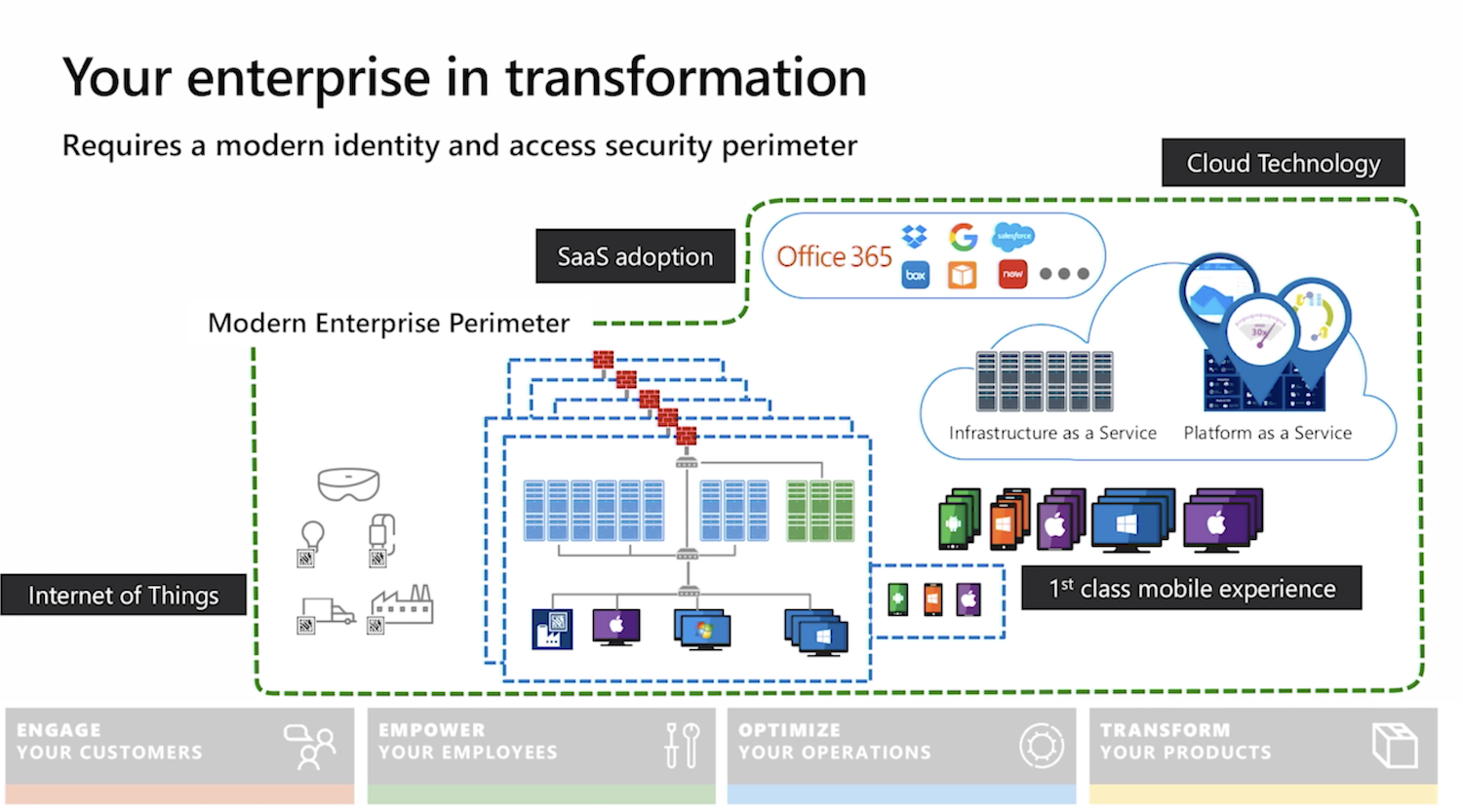
Zero Trust is a relatively new term for a concept that’s been around for a while. The shift to remote working and wider adoption of cloud services has accelerated the transition away from the traditional well understood and controlled network perimeter.

Security professionals should help organisations balance the productivity of their employees with appropriate security measures to manage cyber security risks arising from the new ways of working.

When people talk about Zero Trust, however, they might refer to new technologies marketed by security vendors. But in my opinion, it is as much (if not more) about the communication and foundational IT controls. Effective implementation of the Zero Trust model depends on close cross departmental collaboration between IT, Security, Risk, HR and Procurement when it comes to access control, joiner-mover-leaver process, managing identities, detecting threats and more.

Device management is the foundation of an effective Zero Trust implementation. Asset inventory in this model is no longer just a compliance requirement but a prerequisite for managing access to corporate applications. Security professionals should work closely with procurement and IT teams to keep this inventory up-to-date. Controlling the lifecycle of the device from procuring and uniquely identifying it through tracking and managing changes, to decommissioning should be closely linked with user identities.

People change roles within the company, new employees join and some leave. Collaborating with HR to establish processes for maintaining the connection between device management and employee identities, roles and associated permissions is key to success.

As an example, check out Google’s implementation of the Zero Trust model in their BeyondCorp initiative.

How to pass the AWS Security – Specialty exam

Security Badge

I previously wrote about how to prepare for the Certified Cloud Security Professional (CCSP) and AWS Certified Solutions Architect – Associate exams. Today,  I would like to focus on AWS Security – Specialty.

Exam cost aside, preparing for this specialty can be rather expensive. There is a whole industry around mock practice tests, study books, video tutorials and hands-on labs. Here I’ll aim to outline how to maximise the benefit while minimising costs, focusing on free resources.

Whitepapers, user guides and service FAQs

AWS documentation is arguably the best source of study material out there. I don’t know a single person who passed the exam without reading through at least some of them. Check out the official exam guide for the overview of domains to select the relevant ones. I focused on IAM, KMS, CloudTail, CloudWatch, VPC, Lambda, Inspector, GuardDuty, Athena, Macie and AWS Microsoft AD. At a very minimum, you should read these:

I also wrote about my experience in using security-related AWS services in my blog.

Online courses

Who needs paid for online tutorials when the AWS YouTube channel has a lot of their re:Invent talks available for free? There is literally a video on pretty much every subject you are interested in. There are too many to mention and you could conduct a simple search to find the latest talk on what you want, but I’ll recommend a few to get you started:

If you would rather have a structured online course instead and don’t mind paying a little bit for it, I recommend the Linux Academy and/or A Cloud Guru. I’ve done them both. Personally, I preferred the former as it had some hands-on labs, but A Cloud Guru is shorter and has some good exam tips. Besides, you can try both of them for free for 7 days and decide for yourself.

There is also the official AWS Exam Readiness: AWS Certified Security – Specialty course. It covers the exam structure, gives you tips on tackling questions and provides thorough explanations. I would save this one for last to get a view of your preparedness.

Practice tests

The obvious thing to do is to buy the official practice exam from AWS, right? Well, maybe not. Unless you’ve got it for free for passing one of the other AWS exams previously, you might be better off finding an alternative. It only includes 20 questions (which works out at $2 per question plus tax), and you don’t get to see the answers! Instead, you are presented with a pass/fail summary that gives you the overall percentage broken down by exam domains. You might be better off using the free 15 questions from Whizlabs, although I can’t recommend their paid products. Practice tests are also included in the Linux Academy and A Cloud Guru courses I mentioned above. Plus, the free official Exam Readiness course also comes with 24 questions with answers and explanations at the end. That should be enough to give you the feel for types of question on the exam.

Getting ready

When revising, I found some good notes and a mindmap from other students on the internet. You can also go through a set of flashcards (e.g.  on Quizlet) to recap on what you’ve learned.

With all this preparation, don’t lose track of why you are doing it in the first place: gaining the skills that you can apply in practice. The exam gives a good indication of your weaker areas and encourages you to fill these gaps. The best way to do this is, of course, through hands-on experience. If your organisation relies on AWS, find ways to apply the newly acquired knowledge there to make your cloud infrastructure more secure. If that’s not an option, there is always the Free Tier, where you can put your skills into practice. Finally, the Linux Academy (and some other providers) for a small cost offer you some hands-on labs and even a whole sandboxed playground for you to experiment in.

AWS constantly evolve and refine their services, and add new ones too. Keep this in mind while studying, as things move pretty fast in the cloud world. This also means that your learning is never finished, even if you pass the exam. But I think this is a good thing and I’m sure you agree!

AWS Security Hub: all your security alerts in one place

Security Hub

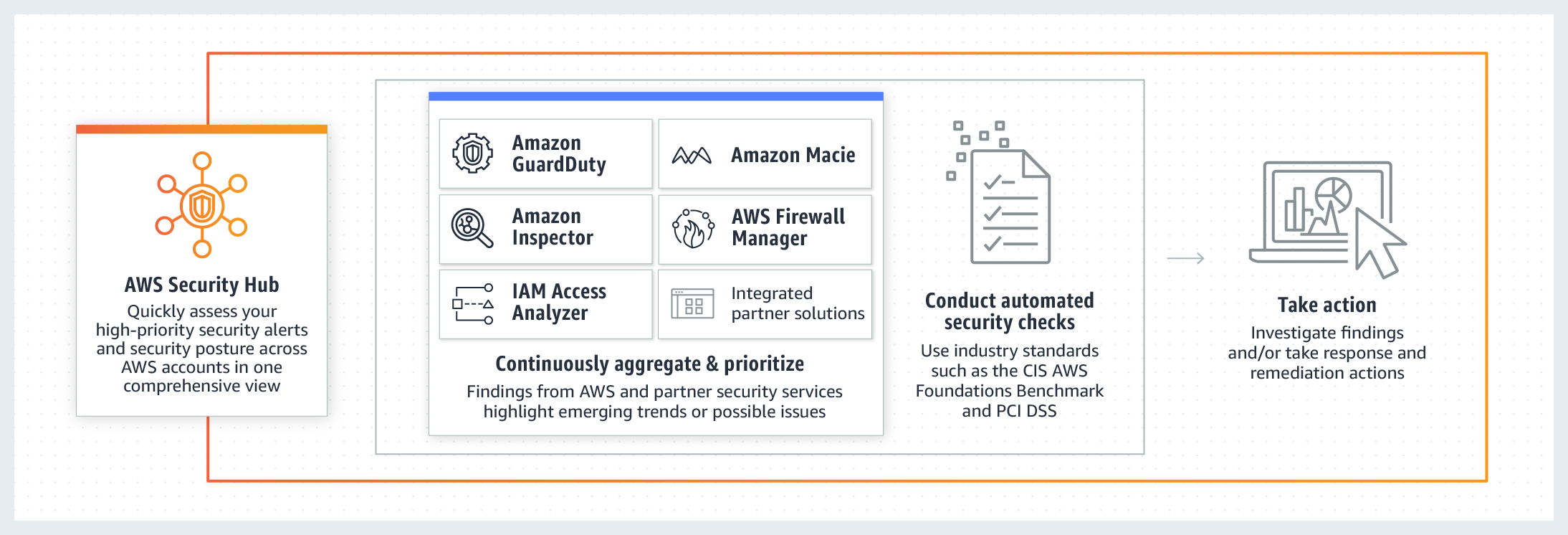
If you are following my blog, you’ve probably noticed that I’ve been focusing on security-specific AWS services in my previous several posts. It’s time to bring them all together into one consolidated view. I’m talking, of course, about the AWS Security Hub.

Security Hub allows you to aggregate and centrally analyse security alerts and findings from Config, GuardDuty, IAM, Inspector, Firewall Manager and more.

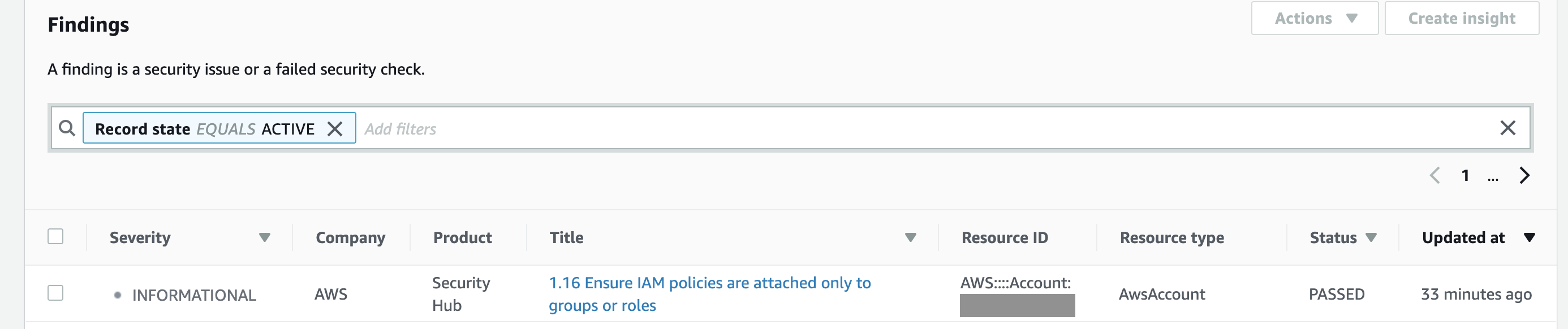
Security Hub findings

You can group, filter and prioritise findings from these services in many different ways. And, of course, you can visualise and make dashboards out of them.

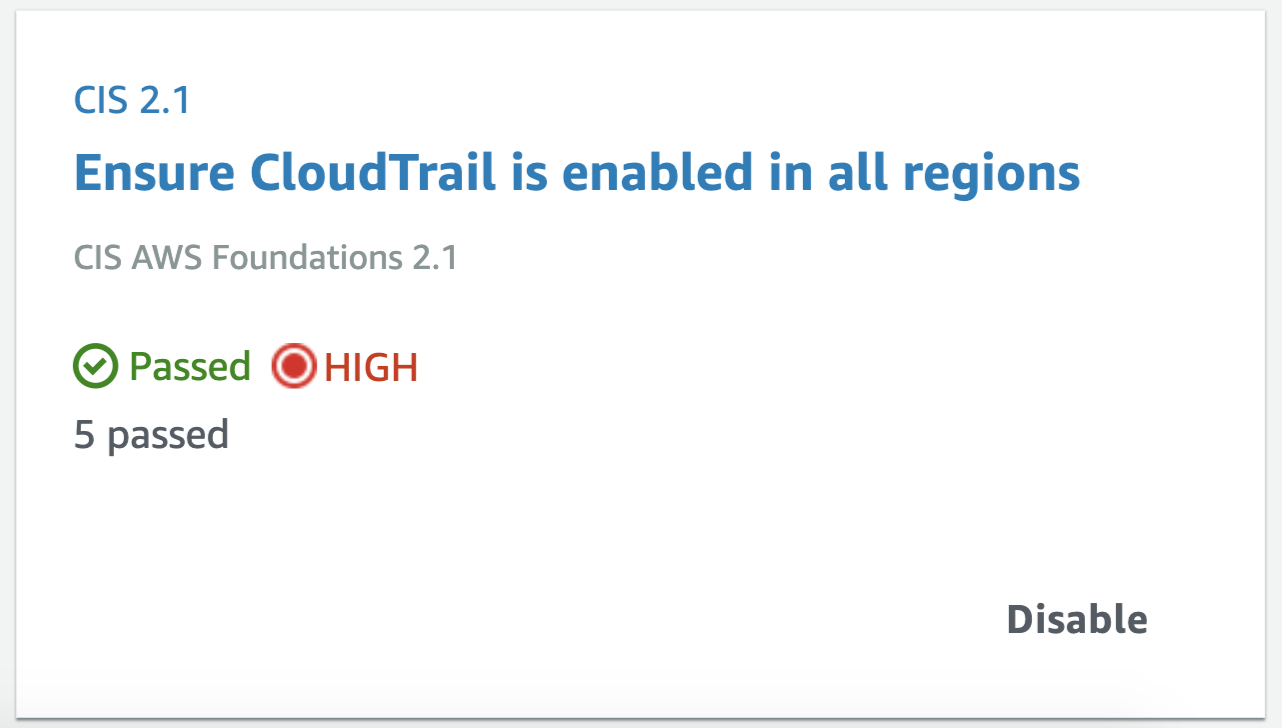
CIS exampleApart from consolidating findings from other services, it also assesses your overall AWS configuration against PCI DSS and/or the CIS Amazon Web Services Foundations Benchmark, which covers identity and access management, logging, monitoring and networking, giving you the overall score (example below) and actionable steps to improve your security posture.
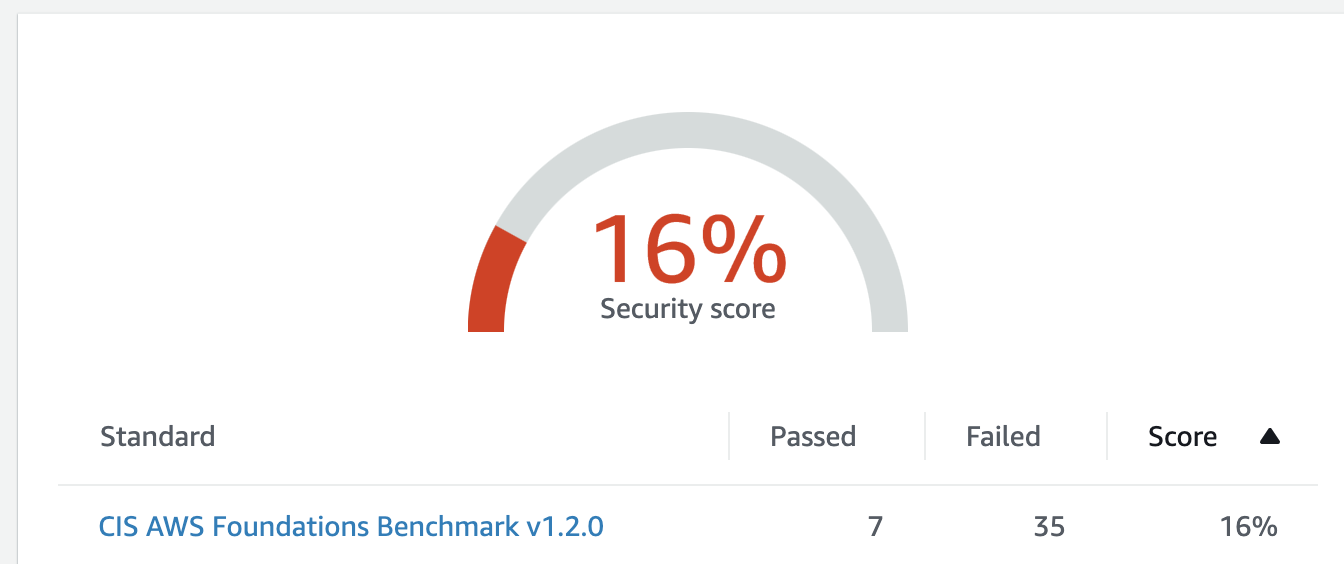
CIS score

Similar to the many other AWS services, Security Hub is regional, so it will need to be configured in every active region your organisation operates. I also recommend setting up your security operations account as a Security Hub master account and then inviting all other accounts in your organisation as members for centralised management (as described in this guidance or using a script).

If you are not a big fan of the Security Hub’s interface or don’t want to constantly switch between regions, the service sends all findings to CloudWatch Events by default, so you  can forward them on to other AWS resources or external systems (e.g. chat or ticketing systems) for further analysis and remediation. Better still, you can configure automated response using Lambda, similar to what we did with Inspector findings discussed previously.

Setting up a Web Application Firewall in AWS

WAF

I wrote about automating application security testing in my previous blog. If you host your application or API on AWS and would like an additional layer of protection agains web attacks, you should consider using AWS Web Application Firewall (WAF).

It is relatively easy to set up and Amazon kindly provide some preconfigured rules and tutorials. AWS WAF is deployed in front of CloudFront (your CDN) and/or Application Load Balancer and inspects traffic before it reaches your assets. You can create multiple conditions and rules to watch for.

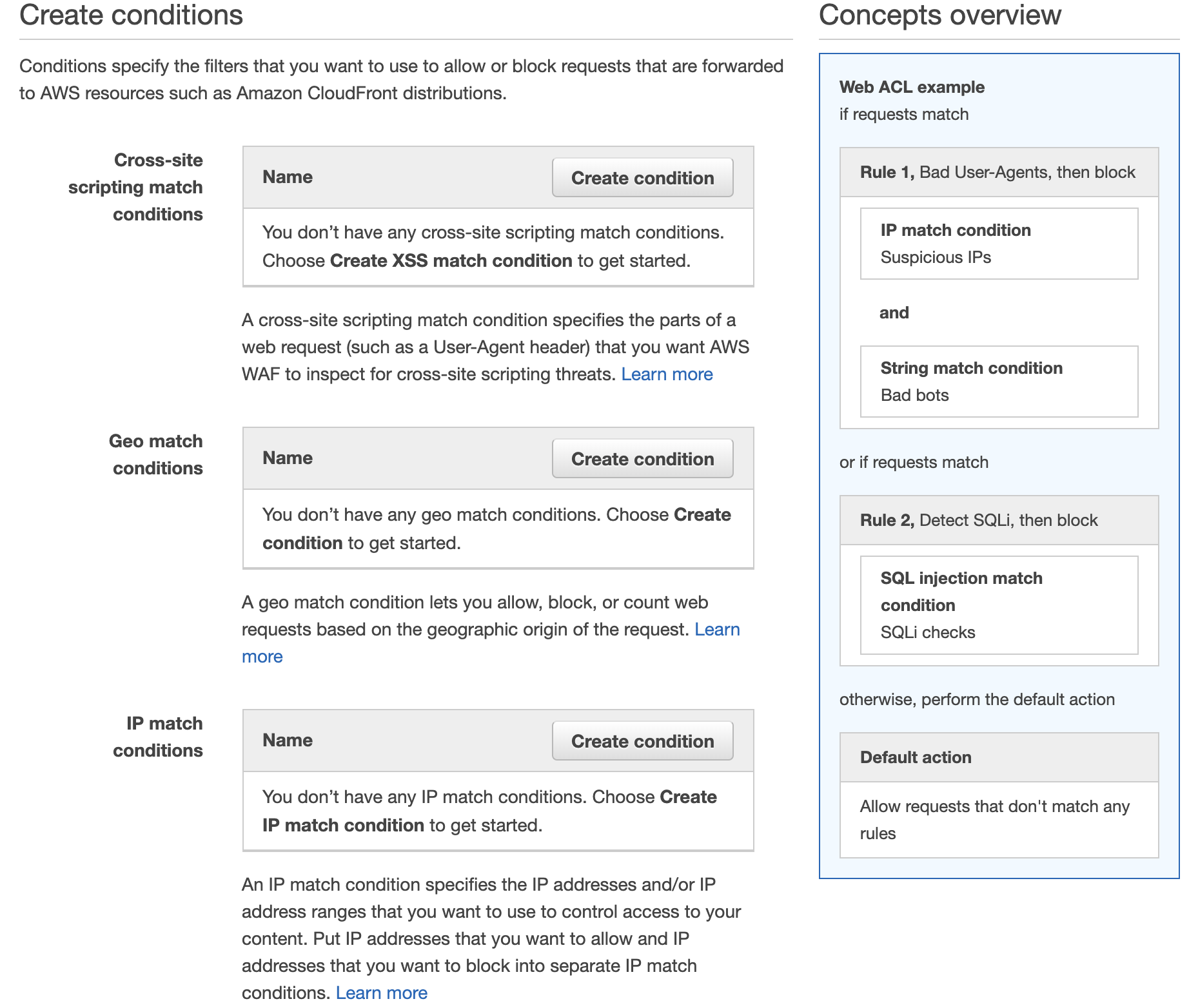
WAF conditions

If you’ve been configuring firewalls in datacentres before the cloud services became ubiquitous, you will feel at home setting up IP match conditions to blacklist or whitelist IP addresses. However, AWS WAF also provides more sophisticated rules for detecting and blocking known bad IP addresses, SQL Injections and Cross Site Scripting (XSS) attacks.

Additionally, you can chose to test your rules first, counting the times it gets triggered rather than setting it to block requests straight away. AWS also throw in a standard level of DDoS protection (AWS Shield) with WAF at no extra cost, so there is really no excuse not to use it.

Automating the detection and remediation of security vulnerabilities in AWS

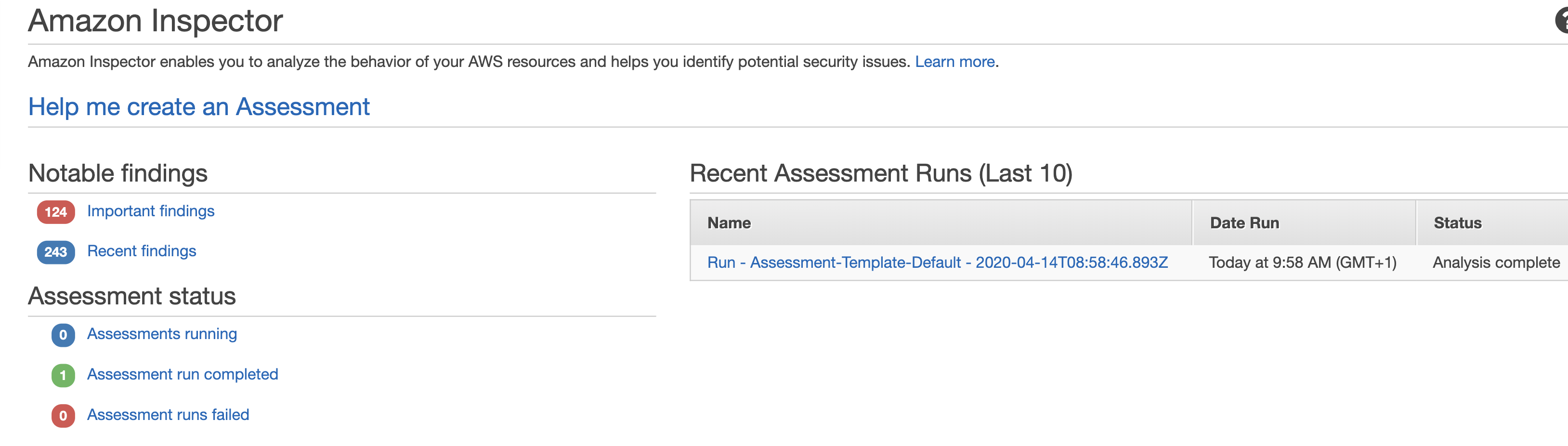
Inspector dashboard

If you rely on EC2 instances in at least some parts of your cloud infrastructure, it is important to reduce the attack surface by hardening them. You might want to check out my previous blogs on GuardDuty, Config, IAM and CloudTrail for other tips on securing your AWS infrastructure. But today we are going to be focusing on yet another Amazon service – Inspector.

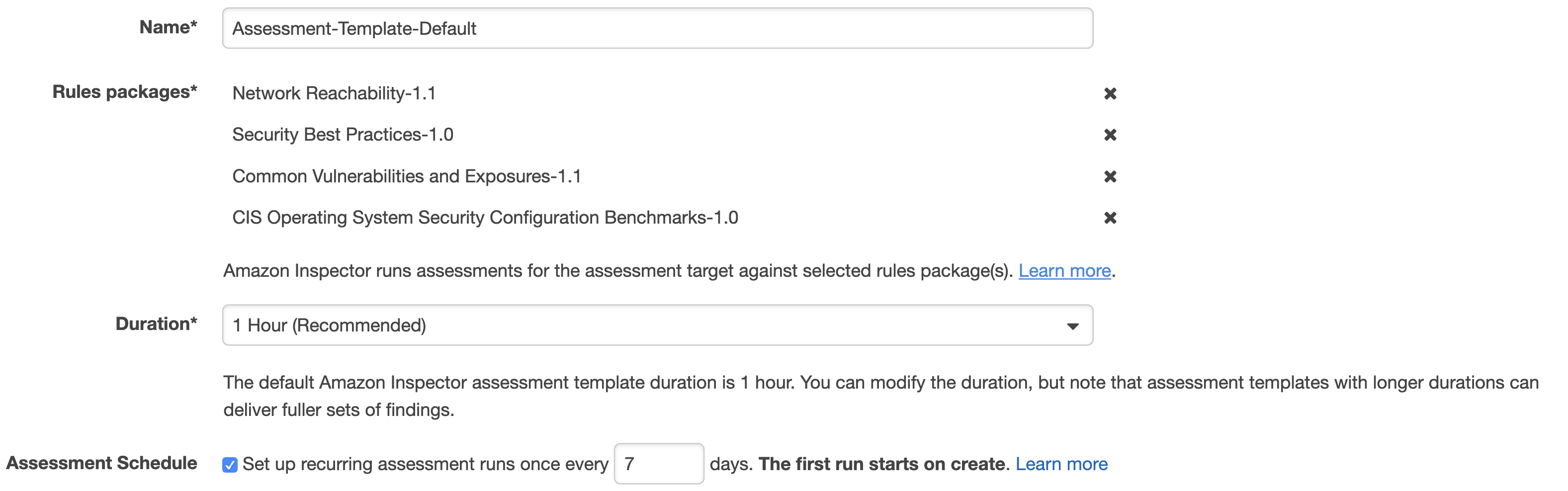
To start with, we need to make sure the Inspector Agent is installed on our EC2 instances. There are a couple of ways of doing this and I suggest simply using the Inspector service Advance Setup option. In addition, you can specify the instances you want to include in your scan as well as its duration and frequency. You can also select the rules packages to scan against.

Inspector setup

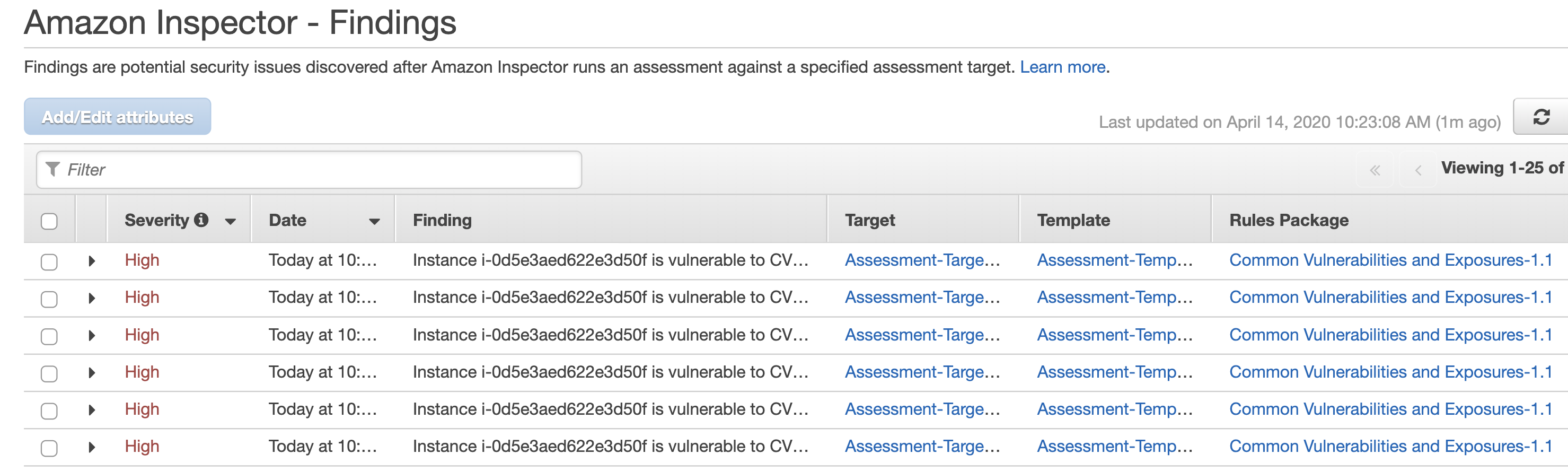
After the agent is installed, the scan will commence in line with the configuration you specified in the previous step. You will then be able to download the report detailing the findings.

Inspector findings

The above setup gives you everything you need to get started but there is certainly room for improvement.

It is not always convenient to go to the Inspector dashboard itself to check for discovered vulnerabilities. Instead, I recommend creating an SNS Topic which will be notified if Inspector finds new weaknesses. You can go a step further and, in the true DevSecOps way, set up a Lambda function that will automatically remediate Inspector findings on your behalf and subscribe it to this topic. AWS kindly open sourced a Lambda job (Python script) that automatically patches EC2 instances when an Inspector assessment generates a CVE finding.

You can see how Lambda is doing its magic installing updates in the CloudWatch Logs:

Commadn line update

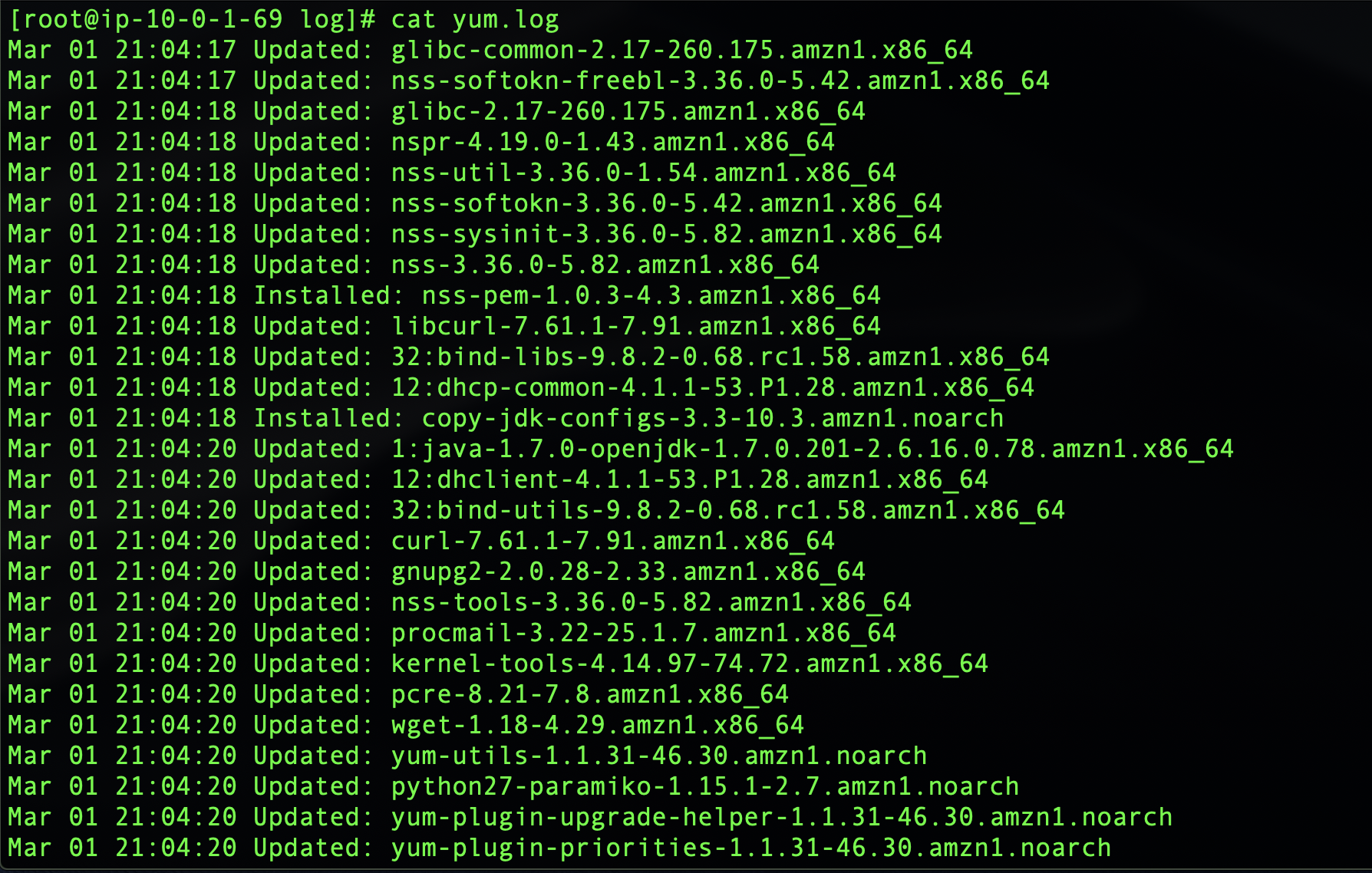
Or you can connect to your EC2 instance directly and check yum logs:

yum update

You will see a number of packages updated automatically when the Lambda function is triggered based on the Inspector CVE findings. The actual list will of course depend on how many updates you are missing and will correspond to the CloudWatch logs.

You can run scans periodically and still choose to receive the notifications but the fact that security vulnerabilities are being discovered and remediated automatically, even as you sleep, should give you at least some peace of mind.