We are entering the agentic era – an inflection point defined by AI systems that can reason, plan and take action autonomously. This shift may be among the most consequential technological transformations of our generation, and it carries an equally significant obligation: to ensure these systems are designed, governed and deployed in ways that earn and sustain trust.
I completed a 5-Day AI Agents Intensive Course where we dove deep in Google’s open source Agent Development Toolkit. In this blog, I’ll share key takeaways and practical suggestions so you can navigate this shift and learn to build AI agents of your own.
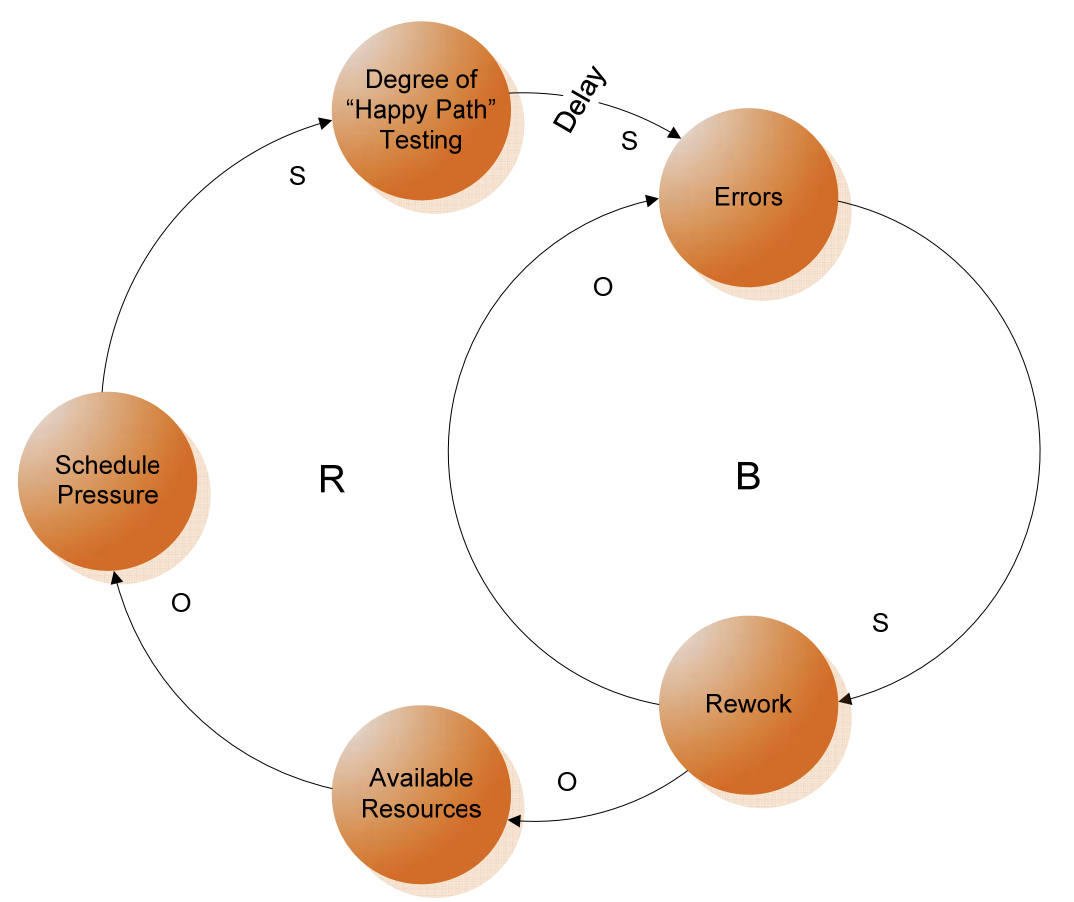
A Causal Loop Diagram of The Happy Path Testing Pattern, Acquisition Archetypes, Carnegie Mellon University
Product security is more than running code scanning tools and facilitating pentests. Yet that’s what many security teams focus on. Secure coding is not a standalone discipline, it’s about developing systems that are safe. It starts with organisational culture, embedding the right behaviours and building on existing code quality practices.
In the DevSecOps paradigm, the need for manual testing and review is minimised in favour of speed and agility. Security input should be provided as early as possible, and at every stage of the process. Automation, therefore, becomes key. Responsibility for quality and security as well as decision-making power should also shift to the local teams delivering working software. Appropriate security training must be provided to these teams to reduce the reliance on dedicated security resources.
I created a diagram illustrating a simplified software development lifecycle to show where security-enhancing practices, input and tests are useful. The process should be understood as a continuous cycle but is represented in a straight line for the ease of reading.
There will, of course, be variations in this process – the one used in your organisation might be different. The principles presented here, however, can be applied to any development lifecycle, your specific pipeline and tooling.
I deliberately kept this representation tool and vendor agnostic. For some example tools and techniques at every stage, feel free to check out the DevSecOps tag on this site.
There is a strong correlation between code quality and security: more bugs lead to more security vulnerabilities. Simple coding mistakes can cause serious security problems, like in the case of Apple’s ‘goto fail’ and OpenSSL’s ‘Heartbleed‘, highlighting the need for disciplined engineering and testing culture.
An open source tool that is gaining a lot of momentum in this space is Semgrep. It supports multiple languages and integrates well in the CI/CD pipeline. You can run Semgrep out of a Docker container and the test results are conveniently displayed in the command line interface.
The rule set is still relatively limited compared to other established players and it might find fewer issues. You can write your own rules, however, and things are bound to improve as the tool continues to develop with contributions from the community.
A more well-known tool in this space is SonarQube. You can still use a free Community Edition for basic testing but advanced enterprise-level features would require a paid subscription. CI/CD integration is possible, inter plugins (like the one for ESLint) are also available.
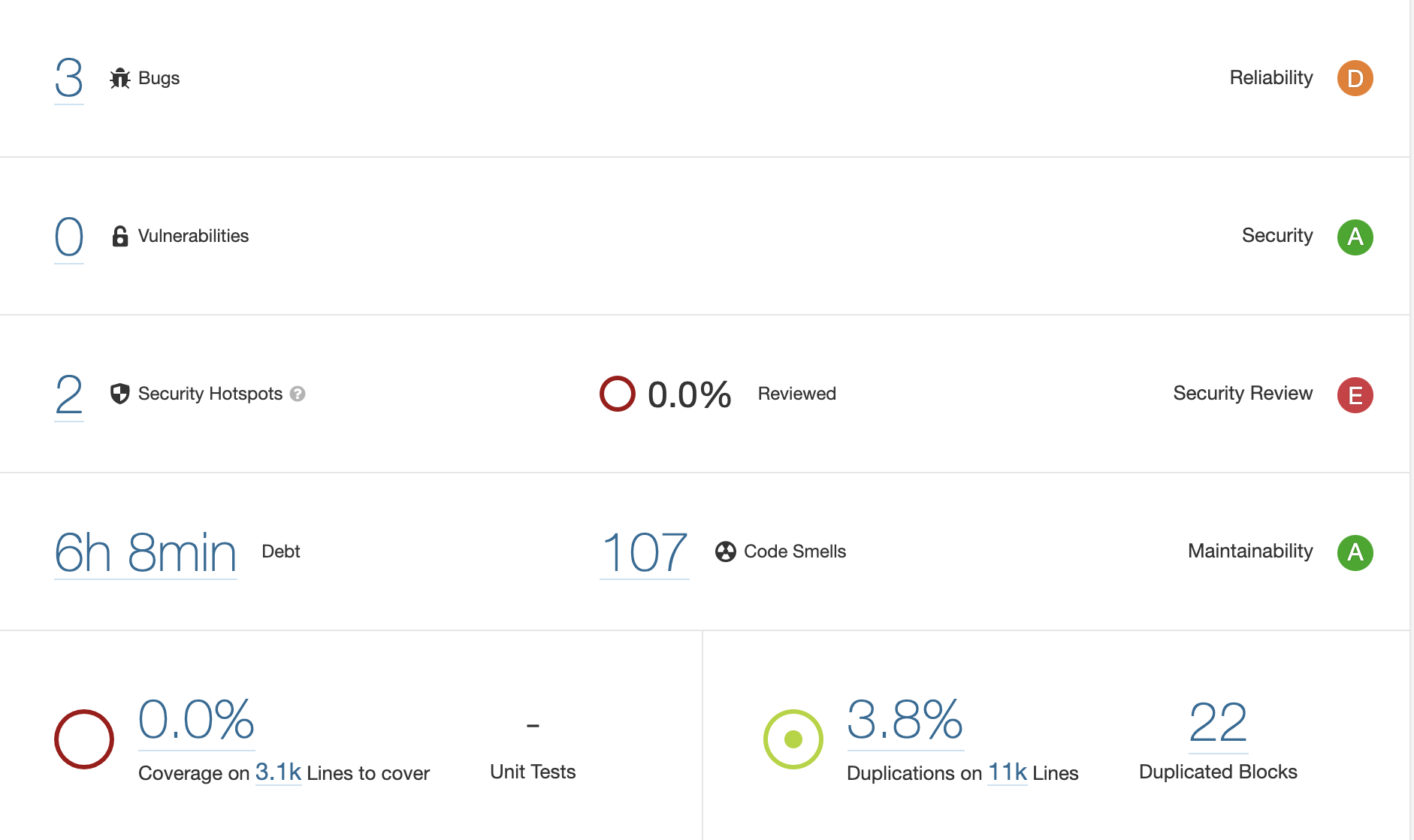
SonarQube has a dashboard view which scores your code across reliability, security, maintainability and other metrics.
As with any tool of this type, to get the best use out of it, some initial configuration is required to reduce the number of false positives, so don’t be discouraged by the high number of bugs or “code smells” being discovered initially.
Keeping in mind the fact that no amount of automation can guarantee finding all the vulnerabilities, I found SonarQube’s analysis around Security Hotspots particularly interesting. It also estimates a time required to pay down the tech debt which can serve as a good indicator of maintainability of your codebase.
It is important to remember that static code analysis tools are not a substitute for the testing culture, code reviews, threat modelling and secure software engineering. They can, however, be a useful set of guardrails for engineers and act as an additional layer in your defence in depth strategy. Although these tools are unlikely to catch all the issues, they can certainly help raise awareness among software developers about quality and security improvements, alert about potential vulnerabilities before they become a problem and prevent the accumulation of tech and security debt in your company.
Drawing on my experience in securing technology startups and software companies, I wrote a guest blog for ISACA on how to embed security in the modern product development. You can check it out here.
Bug bounty programmes are becoming the norm in larger software organisations but it doesn’t mean you have to be Google or Facebook to run one for continuous security testing and engaging with the security community..
Setting it up can be easier than you might think as there are multiple platforms like HackerOne, BugCrowd or similar out there that can help with centralised management. They also offer an option to introduce it gradually through private participation first before opening it to the whole world.
At a minimum, you can have a dedicated email address (e.g. security@yourexamplecompanyname) that security researchers can use to report security issues. Having a page transparently explaining the participation terms, scope and payout rate also helps. Additionally, it’s good to have appropriate tooling to track issues and verify fixes.
Even if you don’t have any of the above, security researchers can still find vulnerabilities in your product and report them to you responsibly, so you effectively get free testing but can exercise limited control over it. Therefore, it’s a good idea to have a process in place to keep them happy enough to avoid them disclosing issues publicly.
There is probably nothing more frustrating for a security researcher than receiving no response (apart perhaps from being threatened legal action), so communication is key. At the very least, thank them and request more information to help verify their finding while you kick off the investigation internally. Bonus points for keeping them in the loop when it comes to plans for remediation, if appropriate.
There are some prerequisites for setting up the bug bounty programme though. Beyond the obvious budget requirement for paying researchers for the vulnerabilities they discover, there is a broader need for engineering resources being available to analyse reported issues and work on improving the security of your products and services. What’s the point of setting up a bug bounty programme if no one is looking at the findings?
Many companies, therefore, might feel they are not ready for a bug bounty programme. They may have too many known issues already and fear they will be overwhelmed with duplicate submissions. These might indeed be problematic to manage, so such organisations are better off focusing their efforts on remediating known vulnerabilities and implementing measures to prevent them (e.g. setting up a Content Security Policy).
They could also consider introducing security tests in the pipeline as this will help catch potential vulnerabilities much earlier in the process, so the bug bounty programme can be used as a fall back mechanism, not the primary way for identifying security issues.
Using abstractions to think about risks is a useful technique to identify the ways an attacker could compromise a system.
There are various approaches to perform threat modelling but at the core, it’s about understanding what we are building, what can go wrong with it and what we should do about it.
Here is a good video by SAFECode introducing the concept:
The Software and Security Engineering course taught at the University of Cambridge is available for free online. It includes video lectures, slide decks, reading materials and more.
Whether you are new to information security or a seasoned professional, this course will help you build solid foundations.
Lecture 9 covering critical systems is my favourite. It bring together previous discussions on psychology, usability and software engineering in the context of safety. It adds to the array of the case studies from Lecture 6, focusing on software failures and what we can learn from them. It also offers a fascinating analysis of the Therac-25 accidents and Boeing 737 Max crashes.
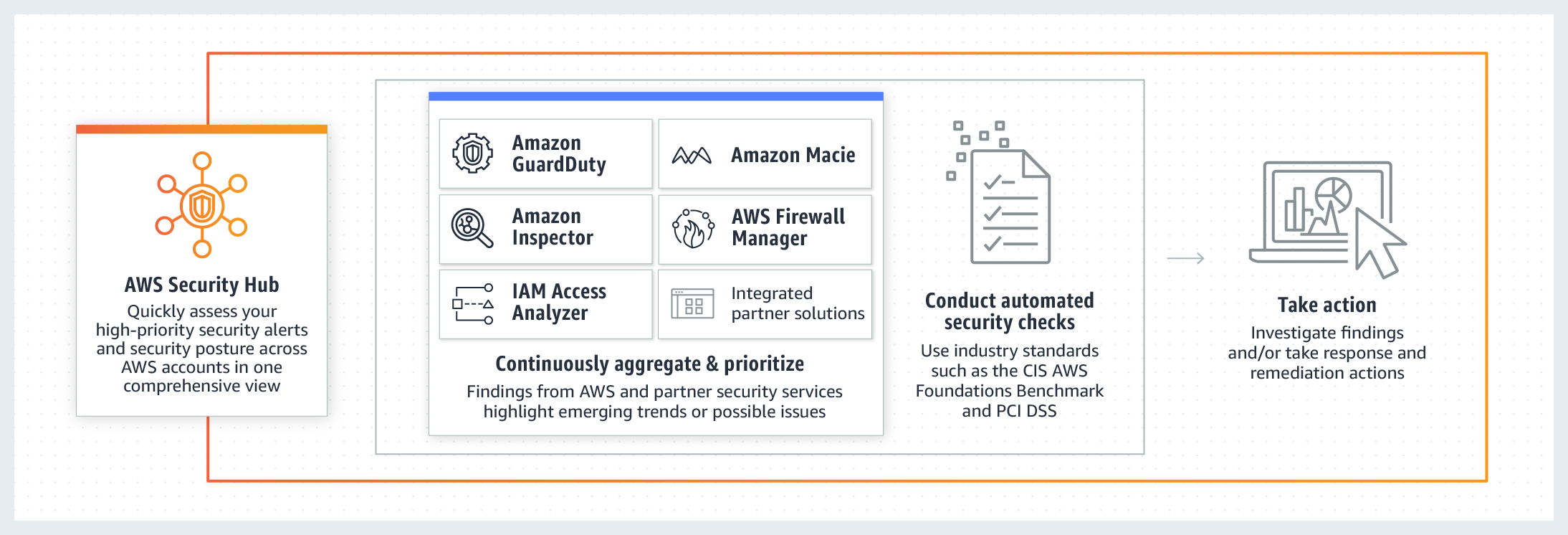
If you are following my blog, you’ve probably noticed that I’ve been focusing on security-specific AWS services in my previous several posts. It’s time to bring them all together into one consolidated view. I’m talking, of course, about the AWS Security Hub.
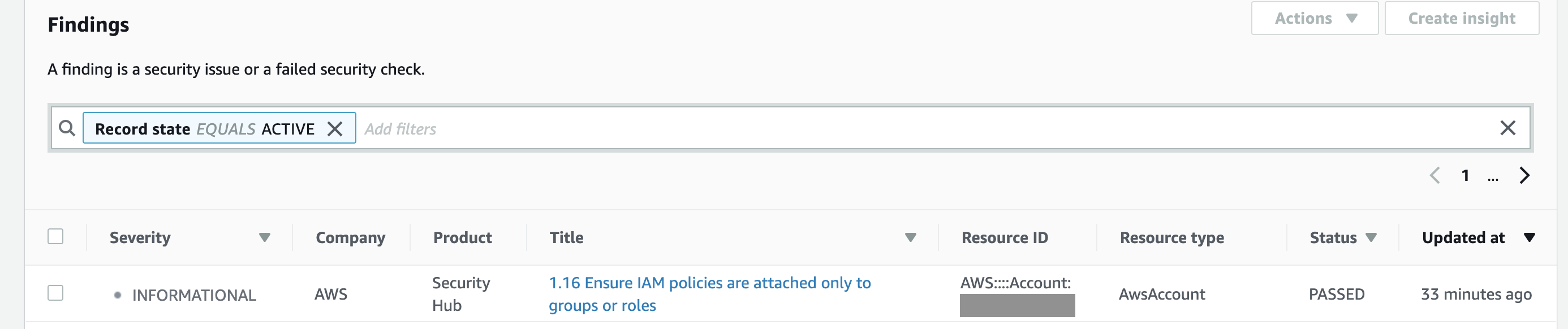
You can group, filter and prioritise findings from these services in many different ways. And, of course, you can visualise and make dashboards out of them.
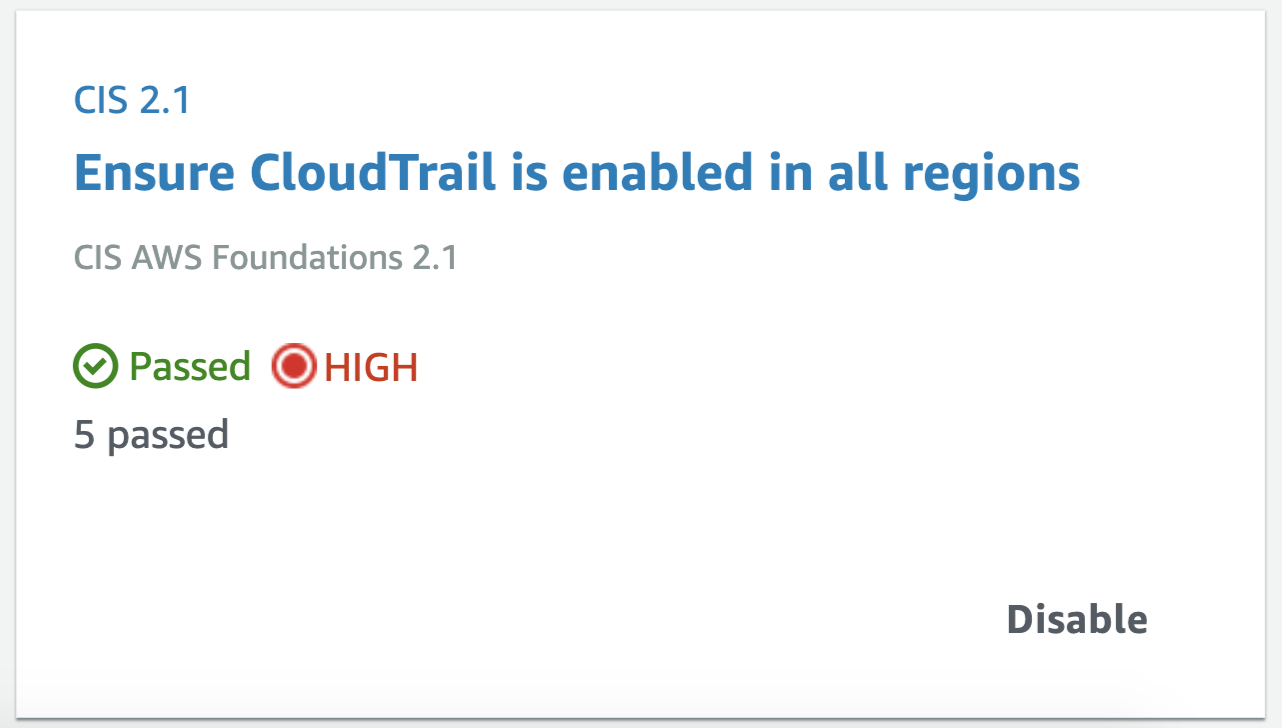
Apart from consolidating findings from other services, it also assesses your overall AWS configuration against PCI DSS and/or the CIS Amazon Web Services Foundations Benchmark, which covers identity and access management, logging, monitoring and networking, giving you the overall score (example below) and actionable steps to improve your security posture.
Similar to the many other AWS services, Security Hub is regional, so it will need to be configured in every active region your organisation operates. I also recommend setting up your security operations account as a Security Hub master account and then inviting all other accounts in your organisation as members for centralised management (as described in this guidance or using a script).
If you are not a big fan of the Security Hub’s interface or don’t want to constantly switch between regions, the service sends all findings to CloudWatch Events by default, so you can forward them on to other AWS resources or external systems (e.g. chat or ticketing systems) for further analysis and remediation. Better still, you can configure automated response using Lambda, similar to what we did with Inspector findings discussed previously.
I wrote about automating application security testing in my previous blog. If you host your application or API on AWS and would like an additional layer of protection agains web attacks, you should consider using AWS Web Application Firewall (WAF).
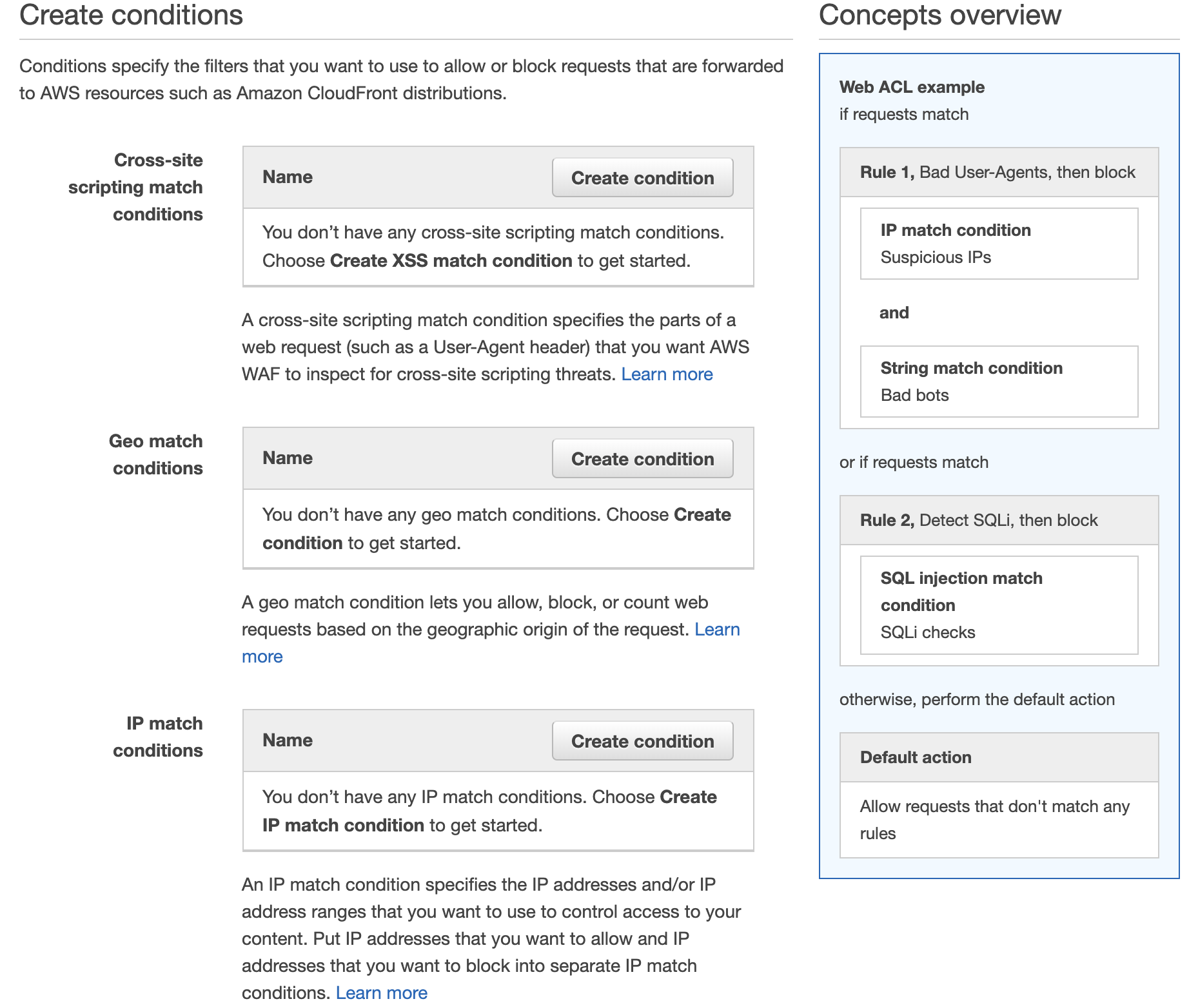
It is relatively easy to set up and Amazon kindly provide some preconfigured rules and tutorials. AWS WAF is deployed in front of CloudFront (your CDN) and/or Application Load Balancer and inspects traffic before it reaches your assets. You can create multiple conditions and rules to watch for.
If you’ve been configuring firewalls in datacentres before the cloud services became ubiquitous, you will feel at home setting up IP match conditions to blacklist or whitelist IP addresses. However, AWS WAF also provides more sophisticated rules for detecting and blocking known bad IP addresses, SQL Injections and Cross Site Scripting (XSS) attacks.
Additionally, you can chose to test your rules first, counting the times it gets triggered rather than setting it to block requests straight away. AWS also throw in a standard level of DDoS protection (AWS Shield) with WAF at no extra cost, so there is really no excuse not to use it.





 Apart from consolidating findings from other services, it also assesses your overall AWS configuration against PCI DSS and/or the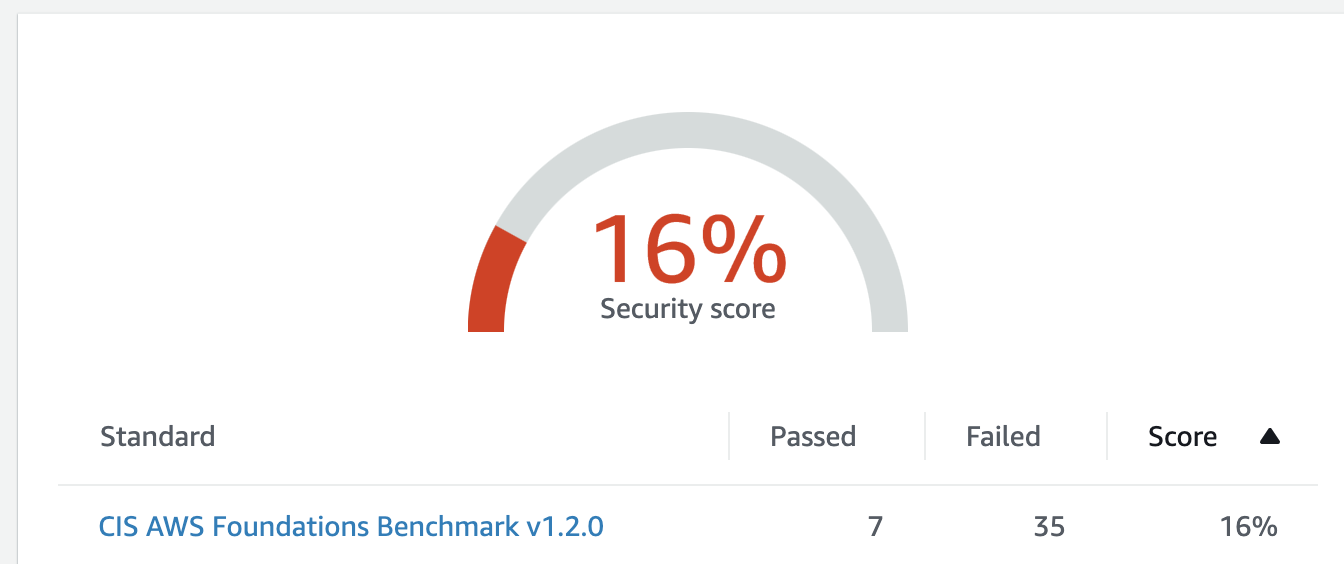



 Cyber Security Leadership