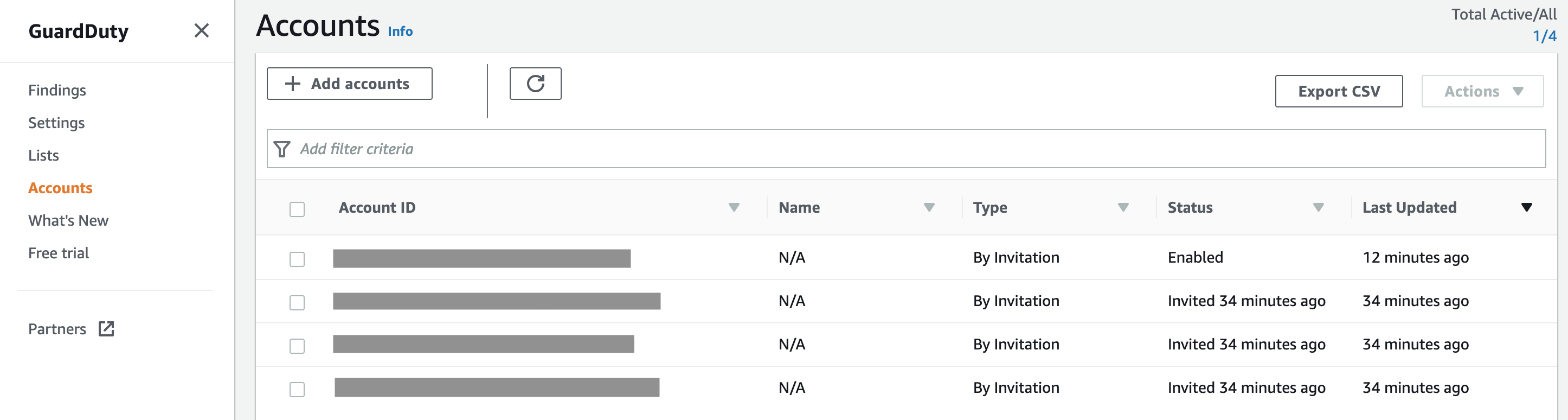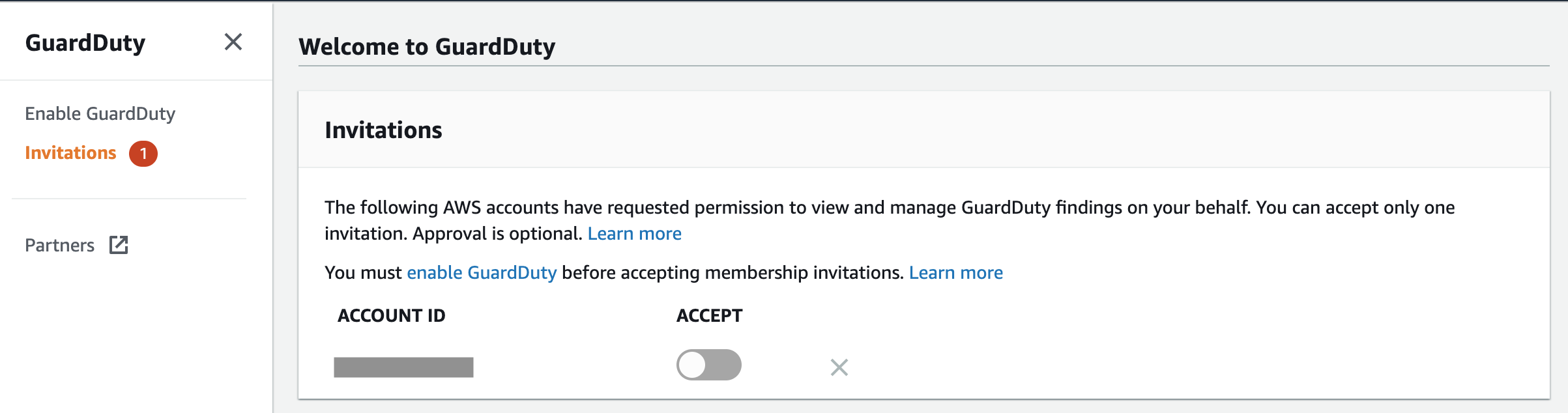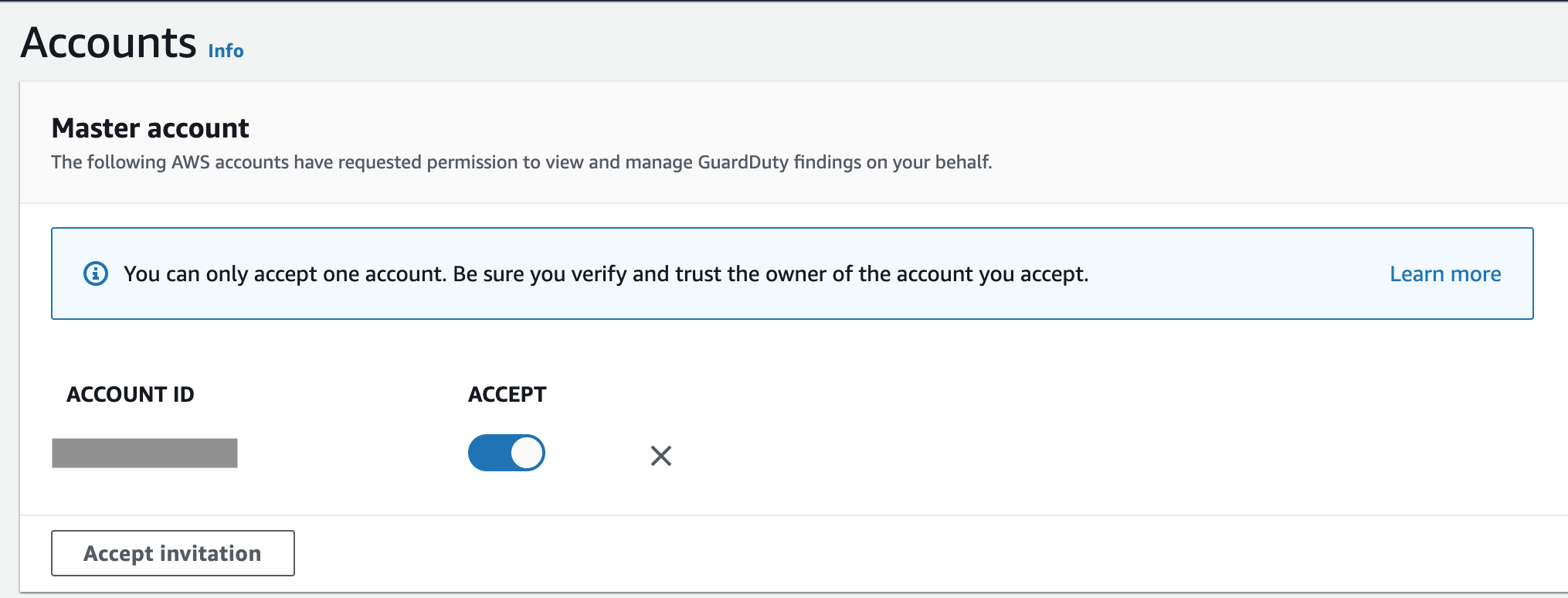
How to set up CloudTrail logging in AWS

I bet you already know that you should set up CloudTrail in your AWS accounts, if you haven’t already. This service captures all the API activity taking place in your AWS account and stores it in an S3 bucket for that account by default. This means you would have to configure the logging and storage permissions for every AWS account your company has. If you are tasked with securing your cloud infrastructure, you will first need to establish how many accounts your organisation owns and how CloudTrail is configured for them. Additionally, you would want to have access to S3 buckets storing these logs in every account to be able to analyse them.

If this doesn’t sound complicated already, think of a potential error in permissions where logs can be deleted by an account administrator. Or situations where new accounts are created without your awareness and therefore not part of the overall logging pipeline. Luckily, these scenarios can be avoided if you are using the Organization Trail.

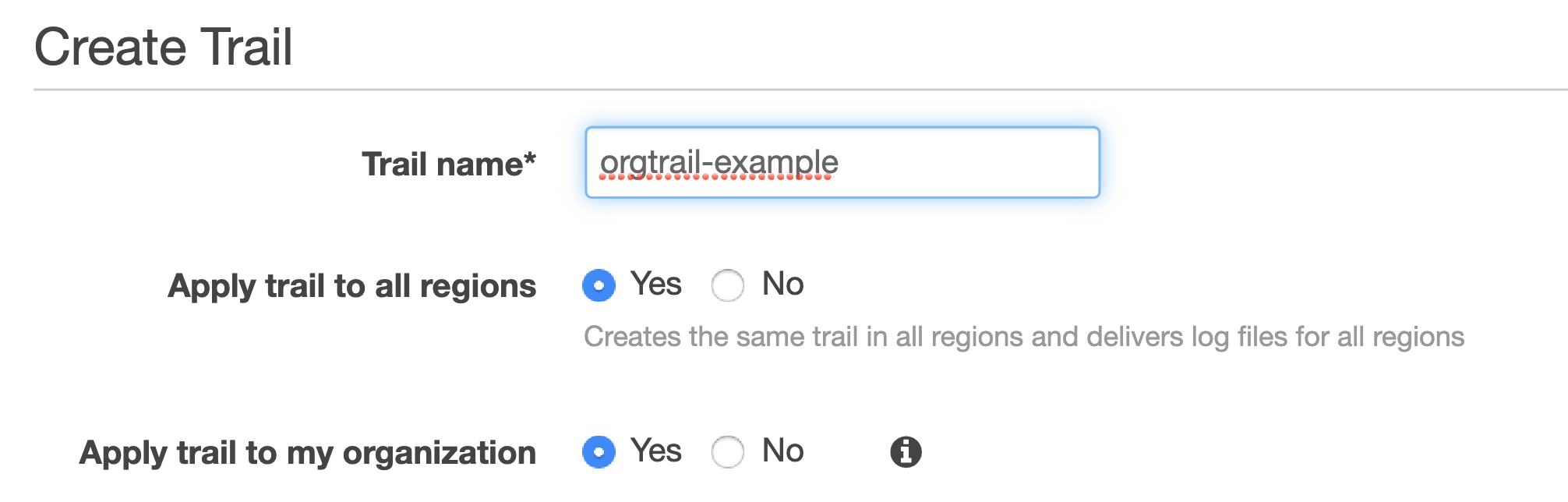
Create Trail

Your accounts have to be part of the same AWS Organization, of course. You would also need to have a separate account for security operations. Hopefully, this has been done already. If not, feel free to refer to my previous blogs on inventorying your assets and IAM fundamentals for further guidance on setting it up.

Establishing an Organization Trail not only allows you to collect, store and analyse logs centrally, it also ensures all new accounts created will have CloudTrail enabled and configured by default (and it cannot be turned off by child accounts).

Trails

Switch on Insights while you’re at it. This will simply the analysis down the line, alerting unusual API activity. Logging data events (for both S3 and Lambda) and integrating with CloudWatch Logs is also a good idea.

Where can all these logs be stored? The best destination (before archiving) is the S3 bucket in your account used for security operations, so that’s where it should be created.

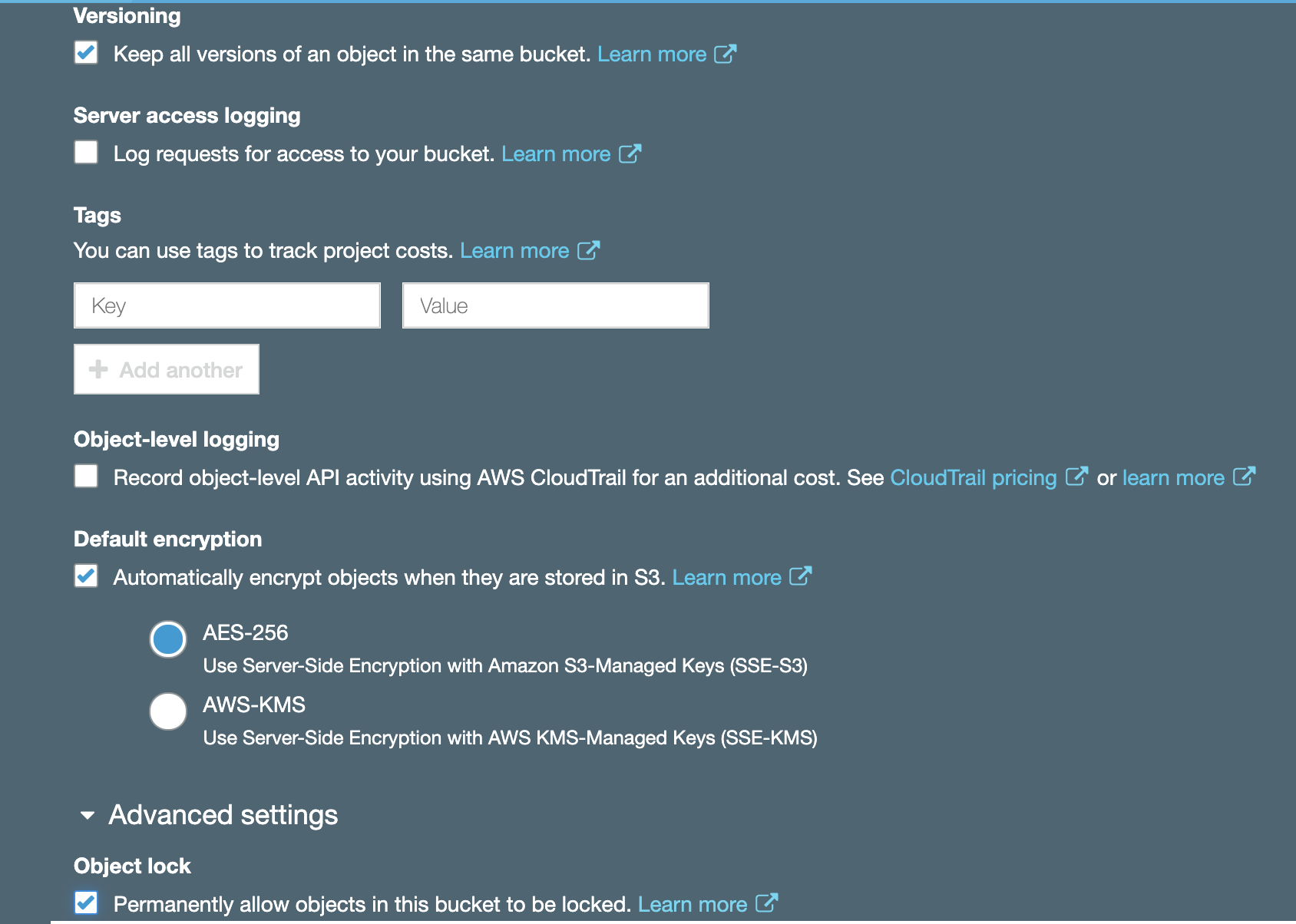
S3 bucket

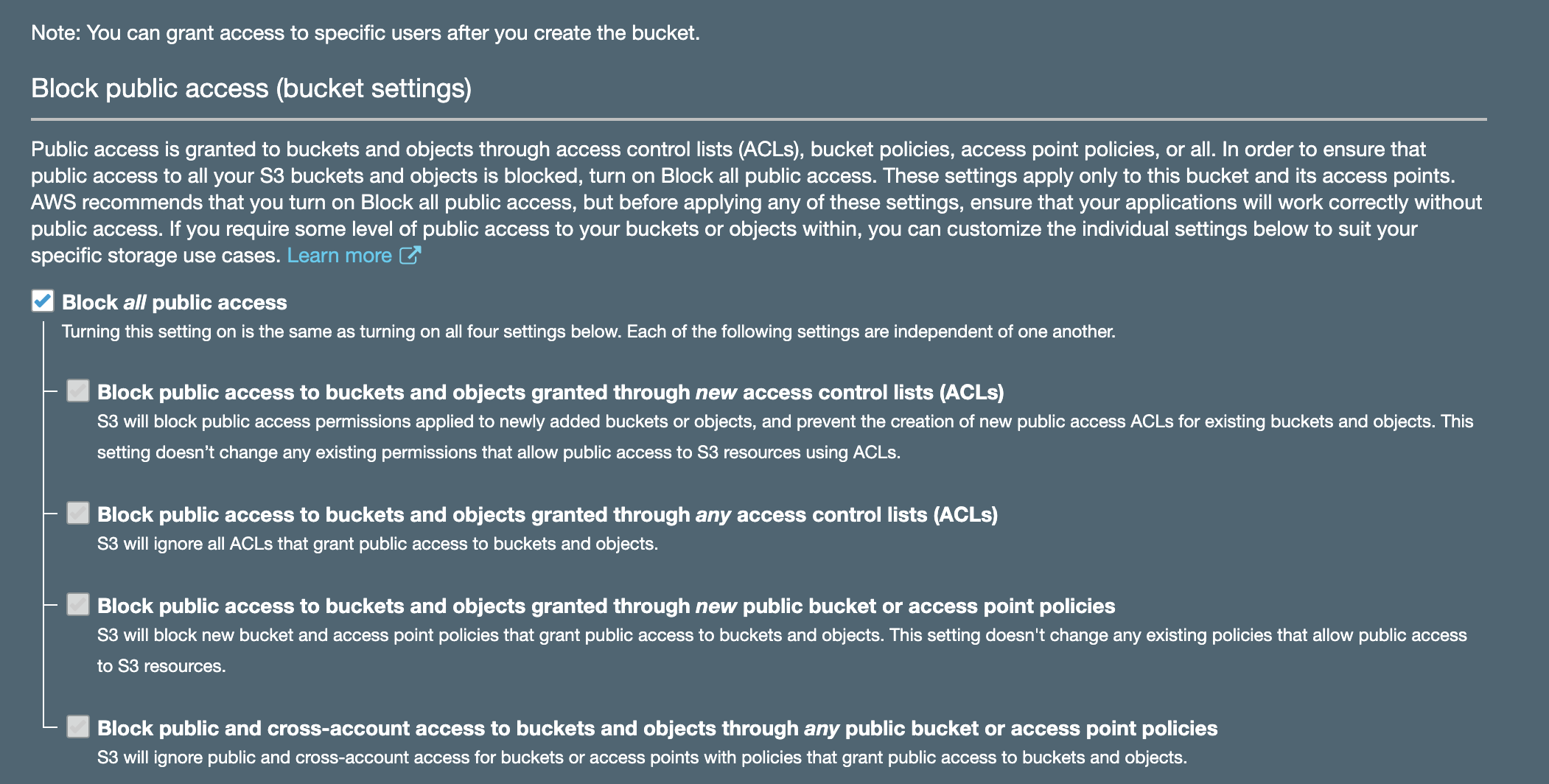
Enabling encryption and Object Lock is always a good idea. While encryption will help with confidentiality of your log data, Object Lock will ensure redundancy and prevent objects from accidental deletion. It requires versioning to be enabled and is best configured on bucket creation. Don’t forget to block public access!

S3 block public access

You must then use your organisational root account to set up Organization Trail, selecting the bucket you created in your operational security account as a destination (rather than creating a new bucket in your master account).

For this to work, you will need to set up appropriate permissions on that bucket. It is also advisable to set up access for child accounts to be able to read their own logs.

If you had other trails in your accounts previously, feel free to turn them off to avoid unnecessary duplication and save money. It’s best to give it a day for these trails to run in parallel though to ensure nothing is lost in transition. Keep your old S3 buckets used for collection in your accounts previously; you will need these logs too. You can configure lifecycle policies and perhaps transfer them to Glacier to save on storage costs later.

And that’s how you set up CloudTrail for centralised collection, storage and analysis.

How to secure a tech startup

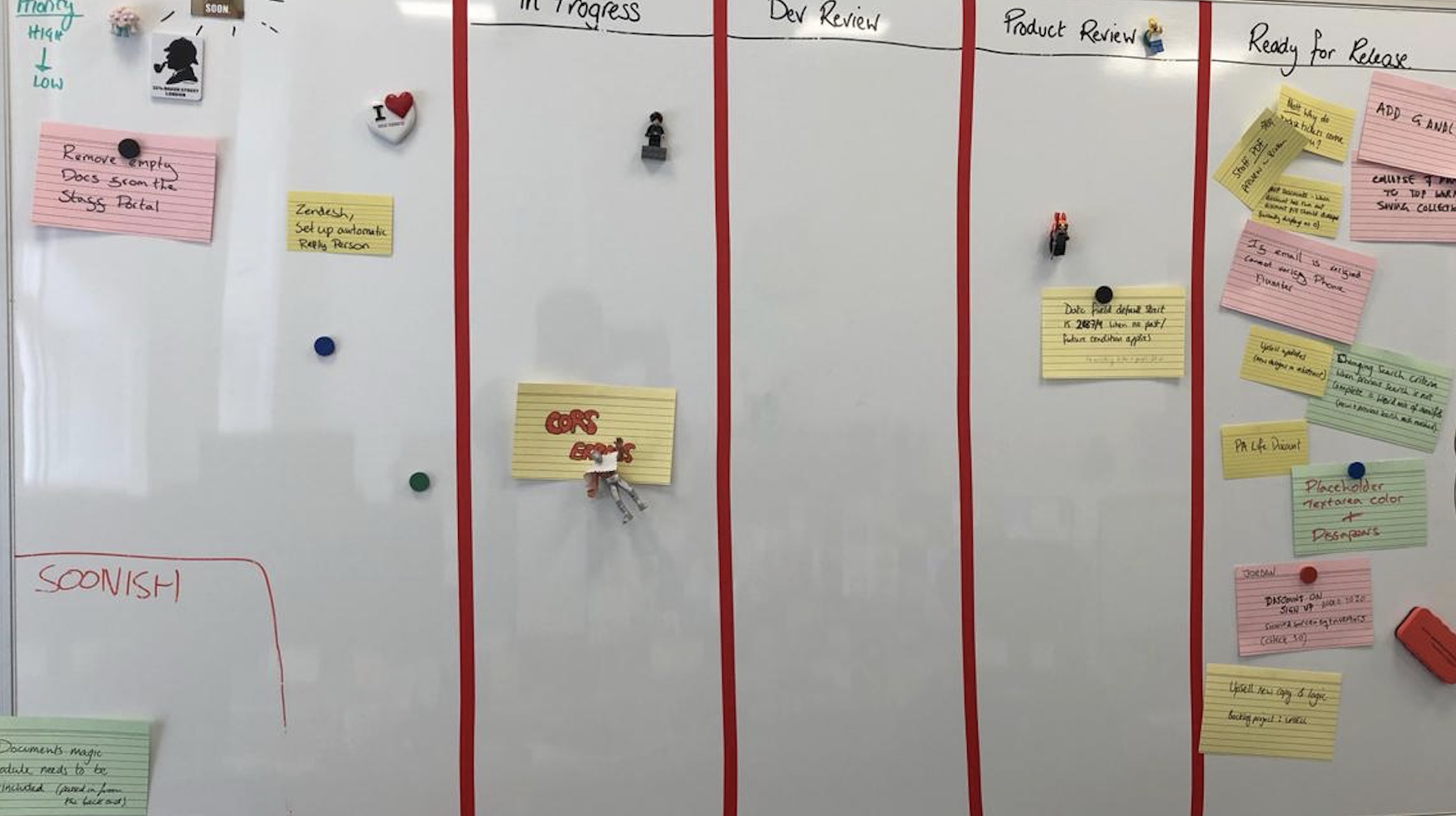
scrum_boardIf you work for or (even better) co-founded a tech startup, you are already busy. Hopefully not too busy to completely ignore security, but definitely busy enough to implement one of the industrial security frameworks, like the NIST Cybersecurity Framework (CSF). Although the CSF and other standards are useful, implementing them in a small company might be resource intensive.

I previously wrote about security for startups. In this blog, I would like to share some ideas for activities you might consider (in no particular order) instead of implementing a security standard straight away. The individual elements and priorities will, of course, vary depending on your business type and needs and this list is not exhaustive.

Product security

Information security underpins all products and services to offer customers an innovative and frictionless experience.

  • Improve product security, robustness and stability through secure software development process
  • Automate security tests and prevent secrets in code
  • Upgrade vulnerable dependencies
  • Secure the delivery pipeline

Cloud infrastructure security

To deliver resilient and secure service to build customer trust.

  • Harden cloud infrastructure configuration
  • Improve identity and access management practices
  • Develop logging and monitoring capability
  • Reduce attack surface and costs by decommissioning unused resources in the cloud
  • Secure communications and encrypt sensitive data at rest and in transit

Operations security

To prevent regulatory fines, potential litigation and loss of customer trust due to accidental mishandling, external system compromise or insider threat leading to exposure of customer personal data.

  • Enable device (phone and laptop) encryption and automatic software updates
  • Make a password manager available to your staff (and enforce a password policy)
  • Improve email security (including anti-phishing protections)
  • Implement mobile device management to enforce security policies
  • Invest in malware prevention capability
  • Segregate access and restrict permissions to critical assets
  • Conduct security awareness and training

Cyber resilience

To prepare for, respond to and recover from cyber attacks while delivering a consistent level of service to customers.

  • Identify and focus on protecting most important assets
  • Develop (and test) an incident response plan
  • Collect and analyse logs for fraud and attacks
  • Develop anomaly detection capability
  • Regular backups of critical data
  • Disaster recovery and business continuity planning

Compliance and data protection

To demonstrate to business partners, regulators, suppliers and customers the commitment to security and privacy and act as a brand differentiator. To prevent revenue loss and reputational damage due to fines and unwanted media attention as a result of GDPR non compliance.

  • Ensure lawfulness, fairness, transparency, data minimisation, security, accountability, purpose and storage limitation when processing personal data
  • Optimise subject access request process
  • Maintain data inventory and mapping
  • Conduct privacy impact assessments on new projects
  • Data classification and retention
  • Vendor risk management
  • Improve governance and risk management practices

Image by Lennon Shimokawa.

How to audit your AWS environment

Cloudmapper

Let’s build on my previous blog on inventorying your AWS assets. I described how to use CloudMapper‘s collect command to gather metadata about your AWS accounts and report on resources used and potential security issues.

This open source tool can do more than that and it’s functionality is being continuously updated. Once the data on the accounts in scope is downloaded, various operations can be performed on it locally without the need to continuously query the accounts.

One of interesting use cases is to visualise your AWS environment in the browser. An example based on the test data of such a visualisation is at the top of this blog. You can apply various filters to reduce complexity which can be especially useful for larger environments.

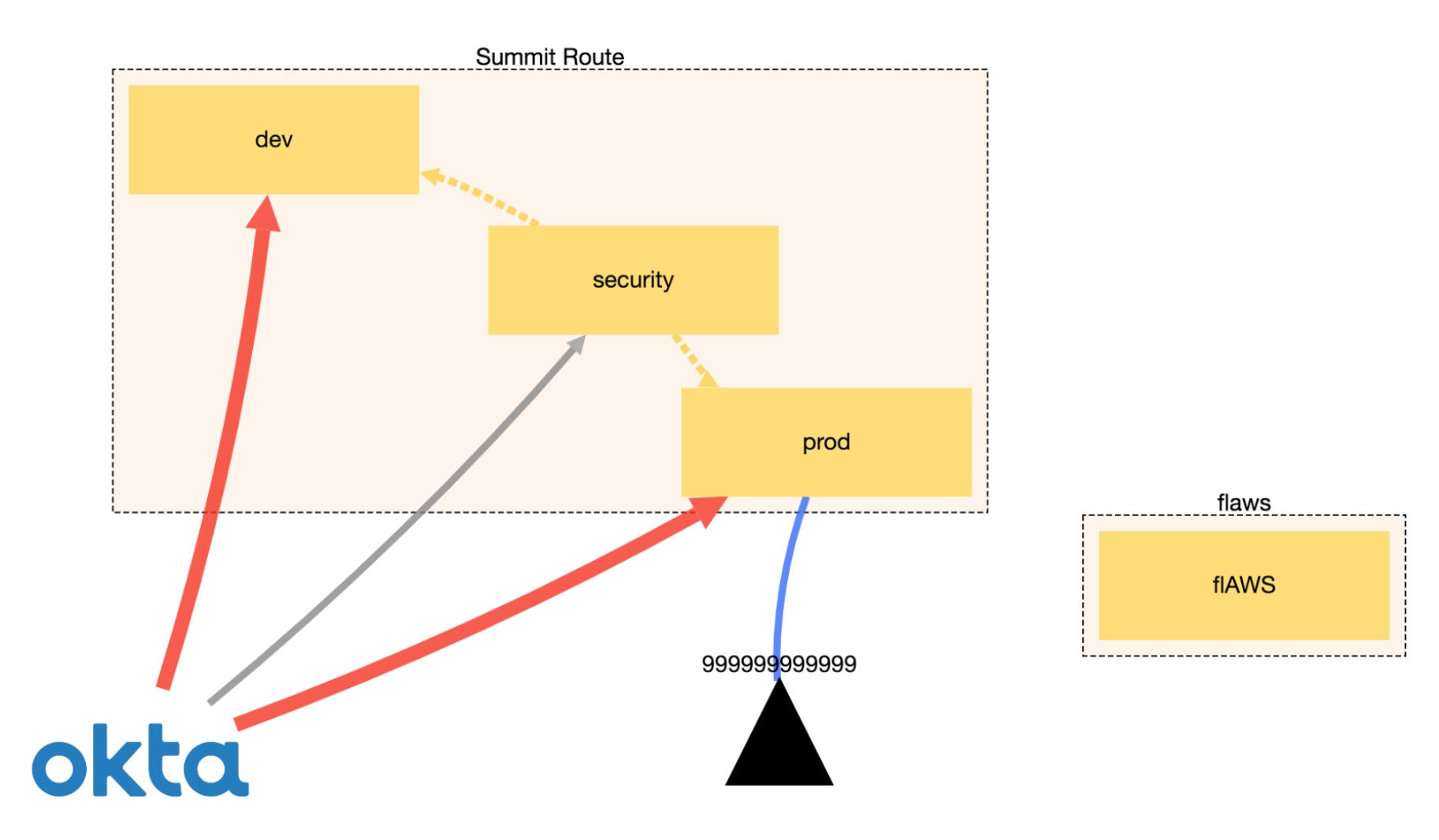
Another piece of CloudMapper’s functionality is the ability to display trust relationships between accounts using the weboftrust command. Below is an example from Scott’s guidance on the use of this command. It demonstrates the connections between accounts, including external vendors.

weboftrust

I’m not going co cover all the commands here and suggest checking the official GitHub page for the latest list. I also recommend running CloudMapper regularly, especially in environments that constantly evolve.

An approach of that conducts regular audits. saving reports and integrating with Slack for security alerts is described here.

Agile security. Part 1: Embedding security in your product

Board

Outline security requirements at the beginning of the project, review the design to check if the requirements have been incorporated and perform security testing before go-live. If this sounds familiar, it should. Many companies manage their projects using the waterfall method, where predefined ‘gates’ have to be cleared before the initiative can move forward. The decision can be made at certain checkpoints to not proceed further, accepting the sunk costs if benefits now seem unlikely to be realised.

This approach works really well in structured environments with clear objectives and limited uncertainty and I saw great things being delivered using this method in my career. There are many positives from the security point of view too: the security team gets involved as they would normally have to provide their sign-off at certain stage gates, so it’s in the project manager’s interest to engage them early to avoid delays down the line. Additionally, the security team’s output and methodology are often well defined, so there are no surprises from both sides and it’s easier to scale.

If overall requirements are less clear, however, or you are constantly iterating to learn more about your stakeholder’s needs to progressively elaborate on the requirements, to validate and perhaps even pivot from the initial hypothesis, more agile project management methodologies are more suitable.

Embedding security in the agile development is less established and there is more than one way of doing it. 

When discussing security in startups and other companies adopting agile approaches, I see a lot of focus on automating security tests and educating developers on secure software development. Although these initiatives have their merits, it’s not the whole story.

Security professionals need to have the bigger picture in mind and work with product teams to not only prevent vulnerabilities in code, but influence the overall product strategy, striving towards security and privacy by design. 

Adding security features and reviewing and refining existing requirements to make the product more secure is a step in the right direction. To do this effectively, developing a relationship with the development and product teams is paramount. The product owner especially should be your best friend, as you often have to persuade them to include your security requirements and user stories in sprints. Remember, as a security specialist, you are only one of the stakeholders they have to manage and there might be a lot of competing requirements. Besides, there is a limited amount of functionality the development can deliver each sprint, so articulating the value and importance of your suggestions becomes an essential skill.

Few people notice security until it’s missing, then the only thing you can notice is the absence of it. We see this time and time again when organisations of various sizes are grappling with data breaches and security incidents. It’s your job to articulate the importance of prioritising security requirements early in the project to mitigate the potential rework and negative impact in the future.

One way of doing this is by refining existing user stories by adding security elements to them, creating dedicated security stories, or just adding security requirements to the product backlog. Although the specifics will depend on your organisation’s way of working, I will discuss some examples in my next blog.

AWS security fundamentals: IAM

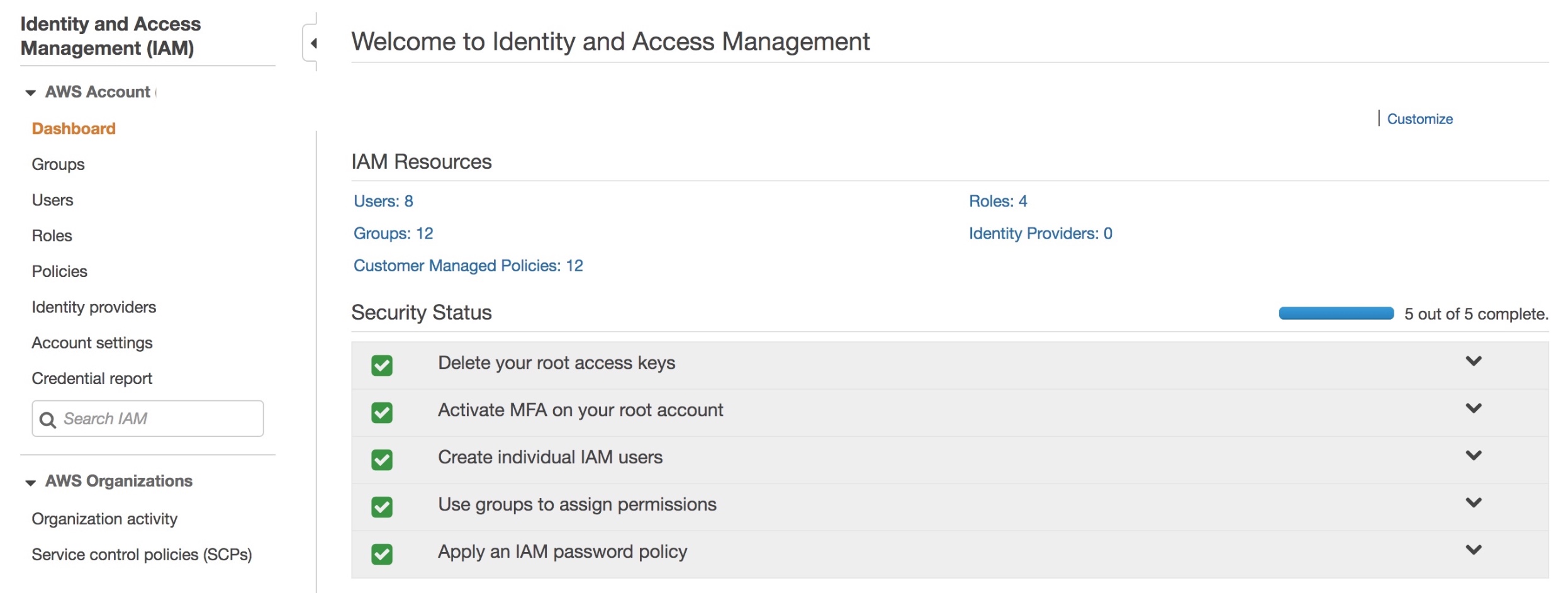
IAM

Here I am going to build on my previous blog of inventorying AWS accounts and talk about identity and access management. By now you have probably realised that your organisation, depending on its size, has more accounts with a lot of associated resources than you initially thought. The way users are created and access is managed in these accounts has a direct impact on the overall security of your infrastructure.

What accounts should your company have? Well it really depends on the nature of your organisation but I tend to see the following pattern for software development driven companies:

1. Organisation root. Your organisation root account should be used to create other accounts (and some other limited amount of operations) and otherwise shouldn’t be touched. Secure the credentials and leave it alone. It should not have any resources associated with it.

2. Identity. Not strictly necessary to have a separate account for this but isn’t it great to be able to manage all your users in a single account?

3. Operations. This account should be used for log collection and analysis. Your security team will be happy.

4, 5 and 6. A separate account for your development, staging and production environments. It’s a good idea to separate them for the ease of managing permissions and pleasing auditors.

Users and services that are managed within an AWS account, should only get access to what they need.

Security specialists are spending a great deal of their time reviewing firewall rules when working on their on-premise infrastructure to ensure they are not too permissive. When we move to the cloud, these rules look somewhat different but their importance has only increased.

To demonstrate the relationship between accounts, users, groups, roles and permissions, let’s walk through an example scenario of a developer in your company requiring read only access to the staging environment.

No automation or anything even remotely advanced is going to be discussed here as we are just covering the basics in this blog. It is no less important, however, to get these right. The principles discussed here will lay the foundation for more advanced concepts. Again, the terminology here is specific to AWS but overarching principles can be applied to any cloud environment.

To start with this scenario, let’s create a custom role CompanyReadOnly and attach an AWS managed ReadOnlyAccess policy in the Permissions tab.

Role Policies
CompanyReadOnly ReadOnlyAccess

This role allows a trusted entity (an account in this case) to access this account. When you access this account you will get the permissions defined in the policy.

Let’s say we have an account where all users are managed (the Identity account in point 2 in the list above). In this account, create a custom policy CompanyAssumeRoleStagingReadOnly allowing assuming the right role, where 123456789012 is Staging account ID which is the trusted entity for the Identity account:

{
    "Version": "2012-10-17",
    "Statement": [
        {
            "Effect": "Allow",
            "Action": "sts:AssumeRole",
            "Resource": "arn:aws:iam::123456789012:role/CompanyReadOnly"
        }
    ]
}

Now let’s create a custom StagingReadOnly group and attach the above policy in the Permission tab.

Group Permissions
StagingReadOnly CompanyAssumeRoleStagingReadOnly

Finally add a user to that group:

User Group Permissions
Developer StagingReadOnly CompanyAssumeRoleStagingReadOnly

In this group additional permissions can be added, e.g. AWS managed enforce-mfa policy for mandatory multi-factor authentication.

Of course, granular policies specifying access to particular services rather than blanket ReadOnly is preferred. Remember the aim here is to demonstrate IAM fundamental principles rather than recommend specific approaches you should use. The policies will depend on the AWS resources your organisation actually uses.

How to inventory your AWS assets

Resource

Securing your cloud infrastructure starts with establishing visibility of your assets. I’ll be using Amazon Web Services (AWS) as an example here but principles discussed in this blog can be applied to any IaaS provider.

Speaking about securing your AWS environment specifically, a good place to start is the AWS Security Maturity Roadmap by Scott Piper. He suggests identifying all AWS accounts in your organisation as a first step in your cloud security programme. 

Following Scott’s guidance, it’s a good idea to check in with your DevOps team and/or Finance to establish what accounts are being used in your company. Capture this information in a spreadsheet, documenting account name, ID, description and an owner at a minimum. You can expand on this in the future to track compliance with baseline requirements (e.g. enabling CloudTrail logs).

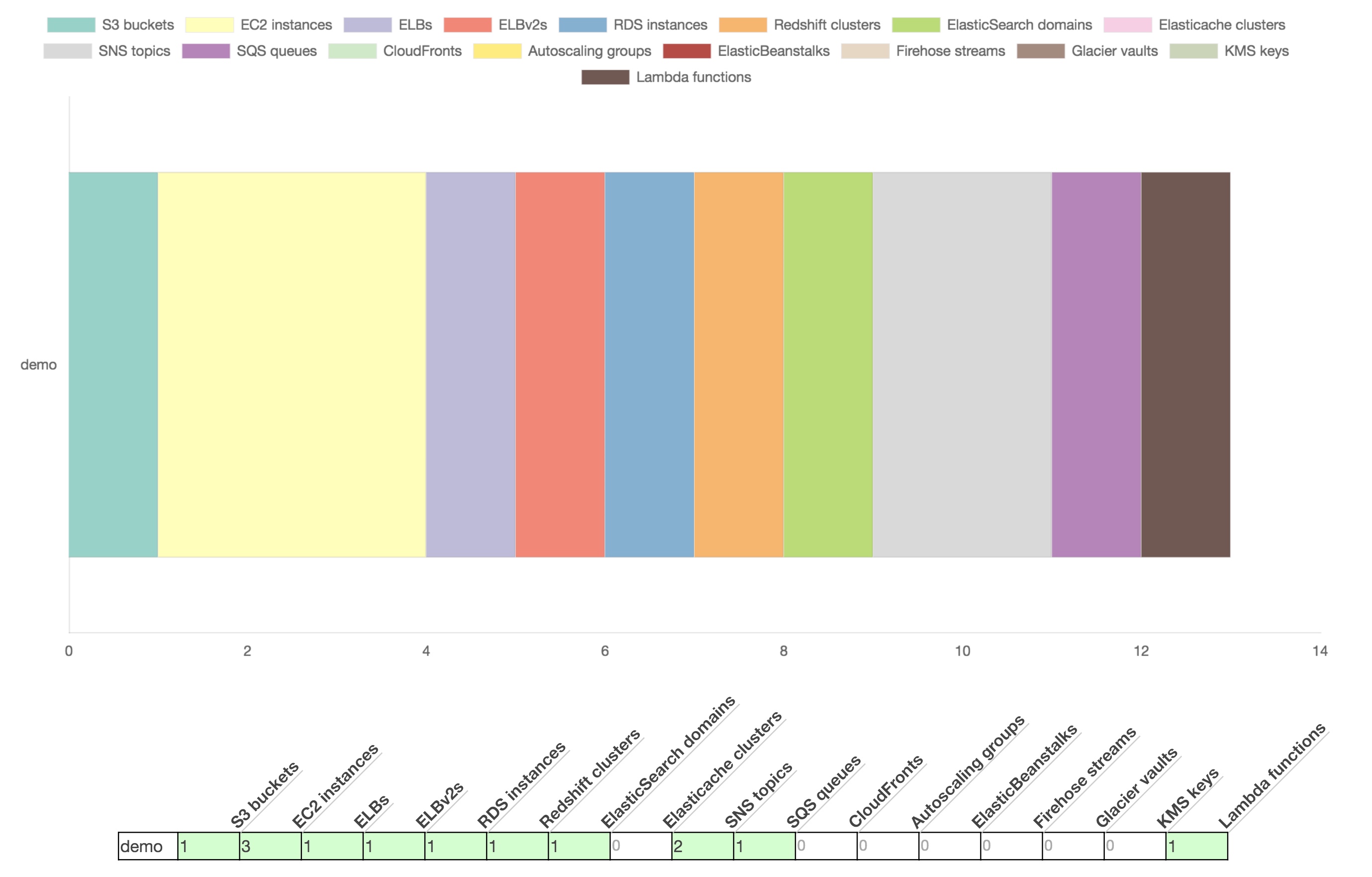
Once we have a comprehensive view of the accounts used in the organisation, we need to find out what resources these accounts use and how they are configured. The simplest way is perhaps to use the AWS Config service. But if you want more detail (and service coverage), you can get metadata about the accounts using CloudMapper’s collect command. CloudMapper is a great open source tool and can do much more than that. It deserves a separate blog, but for now just check out setup instructions on its GitHub page and Scott’s detailed instructions on using the collect command.

The CloudMapper report will reveal the resources you use in all the regions (the image at the top of this blog is from the demo data). This can be useful in scenarios where employees in your company might test out new services and forget to switch them off or nobody knows what these services are used for to begin with. In either case, the company ends up paying for these, so it makes economic sense to investigate, and disabling them will also reduce the attack surface.

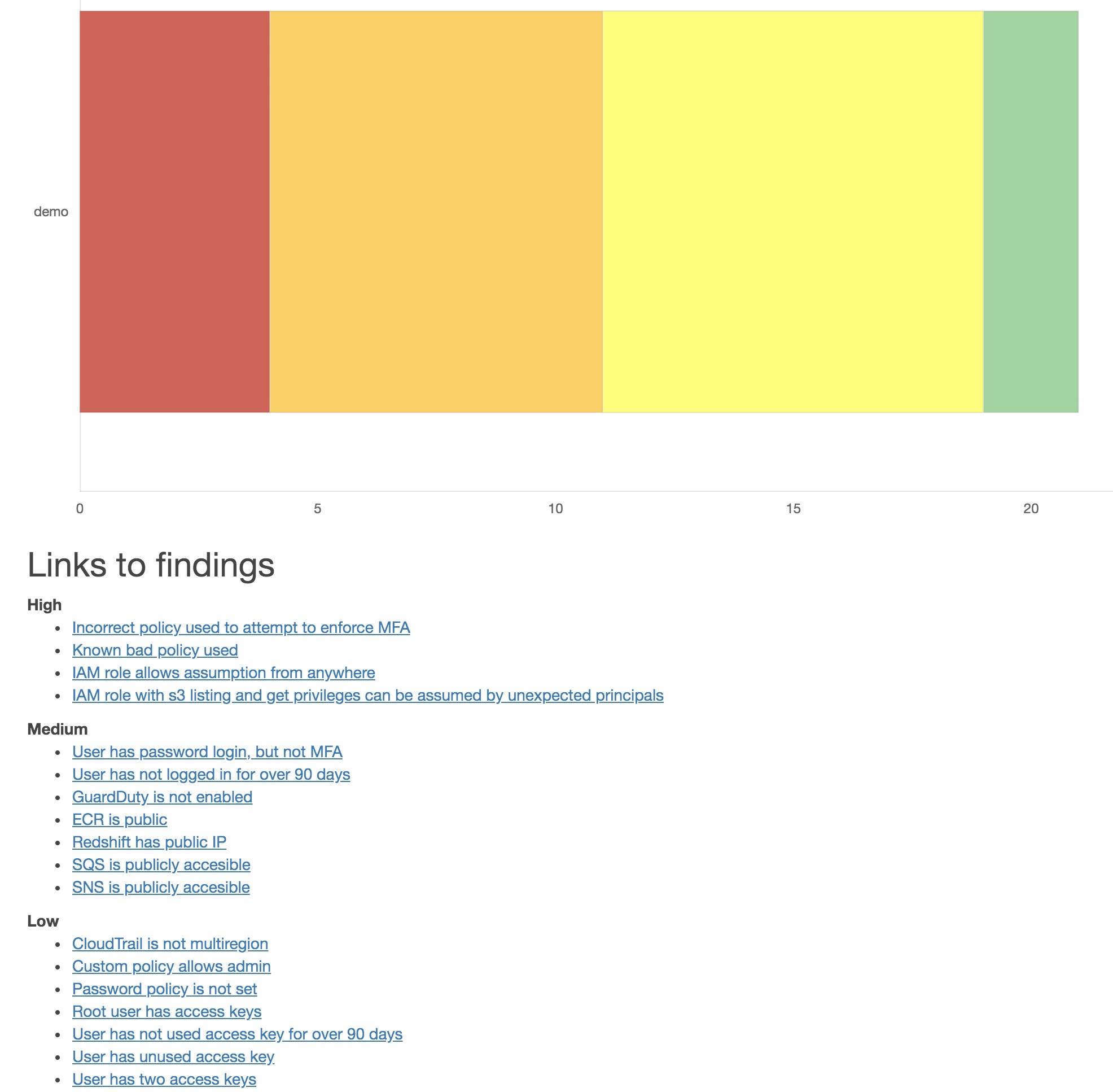
In addition to that, the report includes a section on security findings and will alert of potential misconfigurations on the account. It also provides recommendations on how to address them. Below is an example report based on the demo data. 

Findings

As we are just establishing the view of our assets in AWS at this stage, we are not going to discuss remediation activities in this blog. We will, however, use this report to understand how much work is ahead of us and prioritise accordingly.

Of course, it is always a good idea to tackle high criticality issues like publicly exposed S3 buckets with sensitive information but don’t get discouraged by a potentially large number of security findings. Instead, focus on strategic improvements that will prevent these issues from happening in the future.

To lay the foundation for a security improvements programme at this point, I suggest adding all the identified accounts to an AWS Organisation if you haven’t already. This will simplify account management and billing and allow you to apply organisation-wide service control policies.

The first 100 days as a CISO

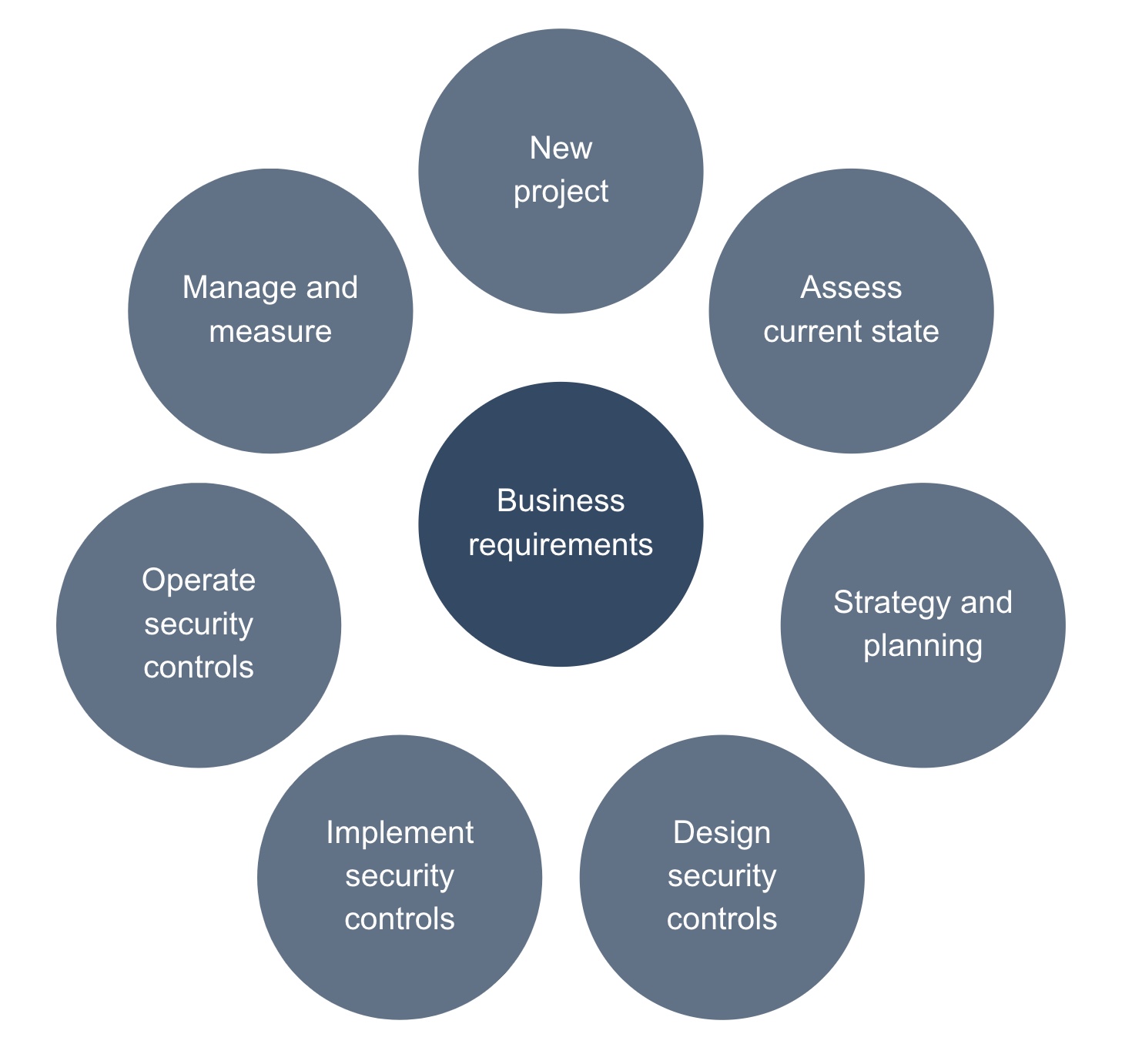
Lifecycle

What should you do in your 100 days in a new company? In short, you should find a way to support the business and present it in a way that is understood and accepted. Communicate broadly and often to ensure constant alignment. Measure your progress in a meaningful way to demonstrate the value to the business.

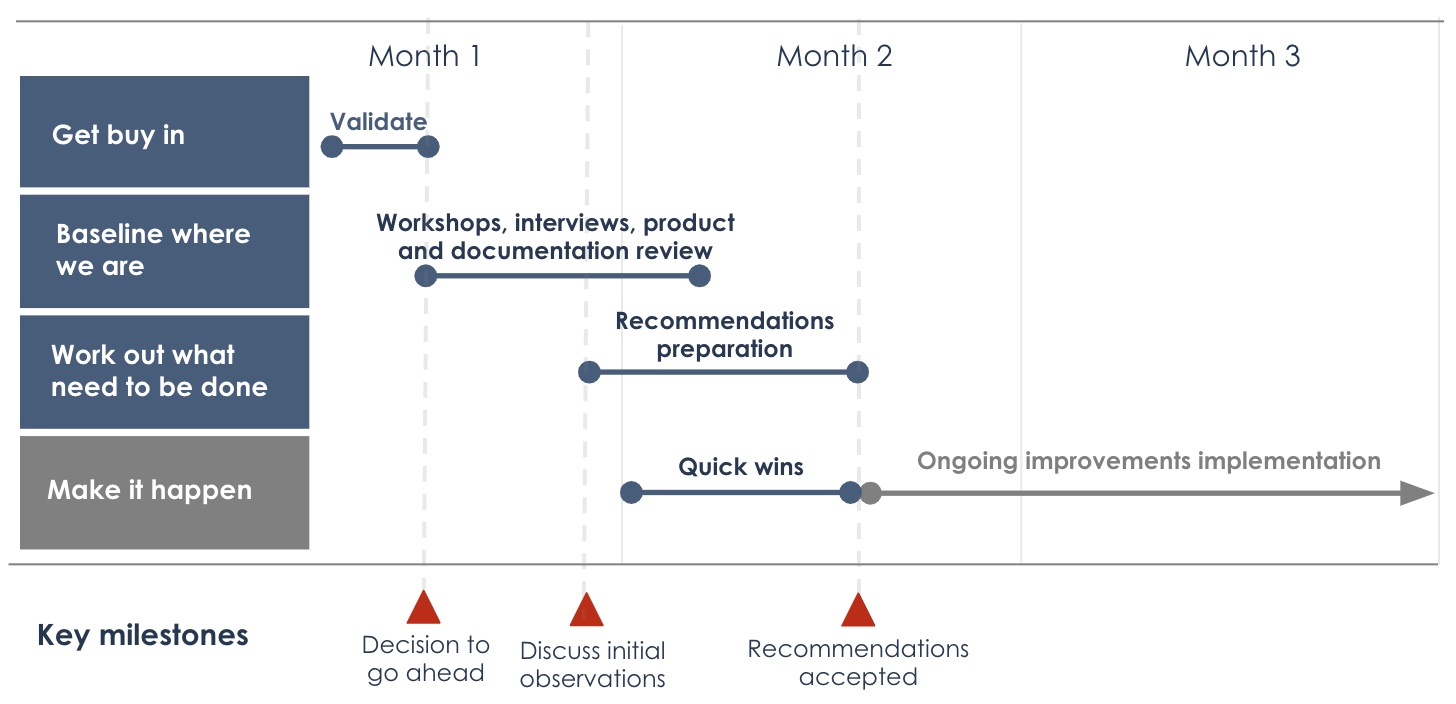
Roadmap

  • Get buy in

Validate top assets, threats and risks. Obtain leadership support on next steps.

  • Baseline where you are

Understand business requirements, technological and regulatory landscape. Perform interviews and review existing product and documentation.

  • Work out what needs to be done

Recommend security improvements to address risks and align with business strategic priorities.

  • Make it happen

Preparing people, establishing good practice and implementing the right technologies and processes.

Timeline.jpeg

Startup security

14188692143_8ed6740a1d_z

In the past year I had a pleasure working with a number of startups on improving their security posture. I would like to share some common pain points here and what to do about them.

Advising startups on security is not easy, as it tends to be a ‘wicked’ problem for a cash-strapped company – we often don’t want to spend money on security but can’t afford not to because of the potential devastating impact of security breaches. Business models of some of them depend on customer trust and the entire value of a company can be wiped out in a single incident.

On a plus side, security can actually increase the value of a startup through elevating trust and amplifying the brand message, which in turn leads to happier customers. It can also increase company valuation through demonstrating a mature attitude towards security and governance, which is especially useful in fundraising and acquisition scenarios.

Security is there to support the business, so start with understanding the product who uses it.  Creating personas is quite a useful tool when trying to understand your customers. The same approach can be applied to security. Think through the threat model – who’s after the company and why? At what stage of a customer journey are we likely to get exposed?

Are we trying to protect our intellectual property from competitors or sensitive customer data from organised crime? Develop a prioritised plan and risk management approach to fit the answers. You can’t secure everything – focus on what’s truly important.

A risk based approach is key. Remember that the company is still relatively small and you need to be realistic what threats we are trying to protect against. Blindly picking your favourite NIST Cybersecurity Framework and applying all the controls might prove counterproductive.

Yes, the challenges are different compared to securing a large enterprise, but there some upsides too. In a startup, more often than not, you’re in a privileged position to build in security and privacy by design and deal with much less technical debt. You can embed yourself in the product development and engineering from day one. This will save time and effort trying to retrofit security later – the unfortunate reality of many large corporations.

Be wary, however, of imposing too much security on the business. At the end of the day, the company is here to innovate, albeit securely. Your aim should be to educate the people in the company about security risks and help them make the right decisions. Communicate often, showing that security is not only important to keep the company afloat but that it can also be an enabler. Changing behaviours around security will create a positive security culture and protect the business value.

How do you apply this in practice? Let’s say we established that we need to guard the company’s reputation, customer data and intellectual property all the while avoiding data breaches and regulatory fines. What should we focus on when it comes to countermeasures?

I recommend an approach that combines process and technology and focuses on three main areas: your product, your people and your platform.

  1. Product

Think of your product and your website as a front of your physical store. Thant’s what customers see and interact with. It generates sales, so protecting it is often your top priority. Make sure your developers are aware of OWASP vulnerabilities and secure coding practices. Do it from the start, hire a DevOps security expert if you must. Pentest your product regularly. Perform code reviews, use automated code analysis tools. Make sure you thought through DDoS attack prevention. Look into Web Application Firewalls and encryption. API security is the name of the game here. Monitor your APIs for abuse and unusual activity. Harden them, think though authentication.

  1. People

I talked about building security culture above, but in a startup you go beyond raising awareness of security risks. You develop processes around reporting incidents, documenting your assets, defining standard builds and encryption mechanisms for endpoints, thinking through 2FA and password managers, locking down admin accounts, securing colleagues’ laptops and phones through mobile device management solutions and generally do anything else that will help people do their job better and more securely.

  1. Platform

Some years ago I would’ve talked about network perimeter, firewalls and DMZs here. Today it’s all about the cloud. Know your shared responsibility model. Check out good practices of your cloud service provider. Main areas to consider here are: data governance, logging and monitoring, identity and access management, disaster recovery and business continuity. Separate your development and production environments. Resist the temptation to use sensitive (including customer) data in your test systems, minimise it as much as possible. Architect it well from the beginning and it will save you precious time and money down the road.

Every section above deserves its own blog and I have deliberately kept it high-level. The intention here is to provide a framework for you to think through the challenges most startups I encountered face today.

If the majority of your experience comes from the corporate environment, there are certainly skills you can leverage in the startup world too but be mindful of variances. The risks these companies face are different which leads to the need for a different response. Startups are known to be flexible, nimble and agile, so you should be too.

Image by Ryan Brooks.
Augusta University’s Cyber Institute adopts my book

jsacacalog

Just received some great news from my publisher.  My book has been accepted for use on a course at Augusta University. Here’s some feedback from the course director:

Augusta University’s Cyber Institute adopted the book “The Psychology of Information Security” as part of our Masters in Information Security Management program because we feel that the human factor plays an important role in securing and defending an organisation. Understanding behavioural aspects of the human element is important for many information security managerial functions, such as developing security policies and awareness training. Therefore, we want our students to not only understand technical and managerial aspects of security, but psychological aspects as well.